Map Maker Utils
作者:rebot | 分类:模组
Minecraft 版本: 26.2
平台: fabric
标签: utility
Map Maker's Utils
Streamline your Map Making & Data Pack workflow in Minecraft 26.1.2 - 1.21.11.
마인크래프트 맵 제작과 데이터팩 개발을 위한 유틸리티 모드입니다.
Overview
Map Maker's Utils is a lightweight Fabric mod designed to reduce repetitive tasks for map makers and data pack developers. It provides commands, in-game editors, and UI improvements for managing data packs and debugging registry errors.
이 모드는 맵 제작자와 데이터팩 개발자가 겪는 반복적인 작업을 줄여줍니다. 데이터팩 관리 명령어, 인게임 편집기, 레지스트리 오류 디버깅을 위한 UI 개선 기능을 제공합니다.
Features (기능)
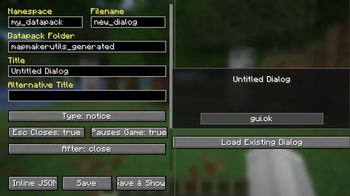
Dialog Editor (v1.2.0)
/dialogeditor [dialogId]
EN: Opens an in-game editor for creating new Dialogs or editing existing Dialog JSON files.
KR: 새로운 Dialog를 만들거나 기존 Dialog JSON 파일을 수정할 수 있는 인게임 편집기를 엽니다.
Supported features:
- Supports
notice,confirmation,multi_action,server_links, anddialog_list - Edit body elements, input controls, and actions
- Supports inline Dialog objects and referenced Dialog IDs
- Validates and normalizes values before exporting
- Saves JSON files directly into a selected world data pack
- Hot-swaps saved Dialogs into the running singleplayer world
지원 기능:
- Minecraft 26.1.2의 모든 Dialog 유형 지원
- Body 요소, 입력 컨트롤 및 액션 편집
- 인라인 Dialog 객체 및 Dialog ID 참조 지원
- 내보내기 전 입력값 검증 및 자동 보정
- 선택한 월드 데이터팩에 JSON 파일 저장
- 저장한 Dialog를 현재 싱글플레이 월드에 즉시 적용
Debug & UI Enhancements
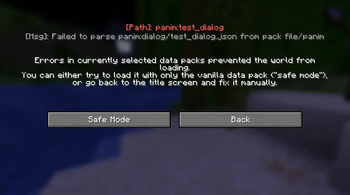
Safe Mode Error Visualization
EN: When entering Safe Mode due to a data pack failure, the specific error log is displayed at the top of the screen for quick debugging.
KR: 데이터팩 파싱 실패로 안전 모드에 진입하면 상단에 원인이 되는 오류 로그를 표시하여 빠른 수정을 돕습니다.
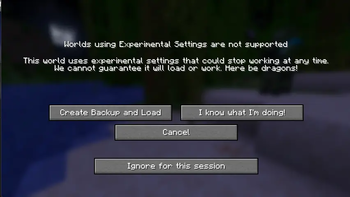
Experimental Session Bypass
EN: Adds an "Ignore for this session" button to the Experimental Registry warning screen. Once clicked, the warning will not appear for that map until the game is restarted.
KR: 실험적 레지스트리 경고 화면에 "이번 세션 무시" 버튼을 추가합니다. 버튼을 누르면 게임을 재시작하기 전까지 해당 맵에서 경고가 표시되지 않습니다.
Workflow Tools
/openpackfolder
EN: Opens the current singleplayer world's datapacks folder in your OS file explorer.
KR: 현재 싱글플레이 월드의 datapacks 폴더를 파일 탐색기로 엽니다.
/openvscode
EN: Opens the current world's datapacks folder in Visual Studio Code. The code command must be available in PATH.
KR: 현재 월드의 datapacks 폴더를 Visual Studio Code로 엽니다. 시스템 PATH에 code 명령어가 등록되어 있어야 합니다.
/hardreload
EN: Reloads the entire singleplayer world by rejoining it. Useful for applying changes that /reload cannot handle.
KR: 싱글플레이 월드를 나갔다 들어오는 방식으로 전체 리로드합니다. /reload로 적용되지 않는 변경사항을 확인할 때 유용합니다.
Clipboard Utilities
/copypos
EN: Copies your current position as integer coordinates.
KR: 현재 위치 좌표를 정수 형태로 클립보드에 복사합니다.
/copypos lookat
EN: Copies the coordinates of the block you are currently looking at.
KR: 현재 바라보고 있는 블록의 좌표를 클립보드에 복사합니다.
/copyrot
EN: Copies your exact facing direction as Yaw Pitch.
KR: 현재 바라보는 방향을 Yaw Pitch 형식으로 클립보드에 복사합니다.
Requirements
- Minecraft 26.1.2 / 1.21.11
- Fabric Loader 0.19.3+
- Fabric API
- Java 25+
License
This mod is available under the MIT License.
Changelog
v26.2-1.2.1 & v26.1.2-1.2.1
- EN: Added a safety confirmation dialog when attempting to save a dialog to a non-existent datapack.
- KR: 존재하지 않는 데이터팩에 다이얼로그를 저장하려고 할 때 안전 확인 경고창을 띄우는 기능을 추가했습니다.
v26.1.2-1.2.0
- Added the
/dialogeditor [dialogId]in-game Dialog JSON editor - Added Dialog validation, normalization, data pack saving, and hot-swapping
- Added
/openvscode - Added
/copypos lookat
v1.21.11-1.1.0
- Added error log display on the Safe Mode screen
- Added "Ignore for session" button for Experimental Registry warnings
- Synchronized Mod ID and filename
- Updated versioning scheme to
MCVersion-ModVersion
请登录后举报
请 登录 后赞助作者。
暂无评论,抢个沙发吧~