
JoinLeavePlus
作者:rebot | 分类:模组
Minecraft 版本: 1.20.5 1.20.6 1.21 1.21.1 1.21.2 1.21.3 1.21.4 1.21.5 1.21.6 1.21.7 1.21.8 1.21.9 1.21.10 1.21.11 26.1 26.1.1 26.1.2 26.2
平台: paper purpur
标签: game-mechanics management utility

? Thanks for 300 downloads! ?
JoinLeavePlus is a very easy to use and lightweight plugin for your Minecraft server that allows you to customize some events that happen when a player joins or leaves. It can change chat join messages, titles on join, sounds on join, and more to come!
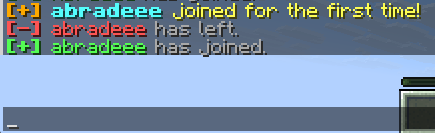
First time join text

Join text

Leave text

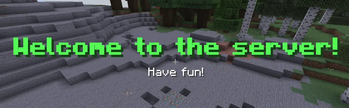
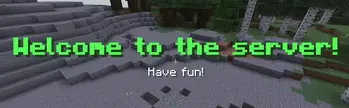
Join title
How to configure messages
In JoinLeavePlus it is very simple to change the join/leave/first time join messages. You can EITHER use MiniMessage OR legacy color coding. Also, as of update 1.4 you can add multiple different messages to have them be randomized. If you don't want randomized messages, just set only one of them. This text can be configured differently if they have joined or not.
How to configure titles
You can now customize the titles that show to a player when they join! You can enter text just how you would in the config with the join messages, using MiniMessage or legacy color coding. These are able to be configured differently for if a player has or hasn't joined before.
How to configure sounds
There are sounds that you can configure in JoinLeavePlus, that you can set in the config. If you want to change it from the default, go to the config and set it to a sound ID like minecraft:entity.experience_orb.pickup. The config also allows setting different sounds for if a player has joined before or not.
Location:
/plugins/JoinLeavePlus/config.ymlDefault config:
#    __     _     __                    _____ _
# __|  |___|_|___|  |   ___ ___ _ _ ___|  _  | |_ _ ___
#|  |  | . | |   |  |__| -_| .'| | | -_|   __| | | |_ -|
#|_____|___|_|_|_|_____|___|__,|\_/|___|__|  |_|___|___|
# developed by abradee
# (c) 2020-2026 abradee
# (c) 2025-2026 JoinLeavePlus under GPL-3.0 license

# Configure your join and leave messages here!
# Note: supports EITHER MiniMessage or legacy formatting

# TOGGLES
# You either put true or false here. It is case sensitive and needs to be all lowercase.
first-time-join-messages: true
join-messages: true
leave-messages: true

first-time-join-sounds: true
join-sounds: true

first-time-join-books: true

first-time-join-titles: true
join-titles: true

# CHAT MESSAGES
first-time-join:
  - "<gold><b>[+] </b><aqua>%player% </aqua><gradient:#ffff55:#ffaa00>joined for the first time!</gradient> <white>Welcome aboard!</white>"
  - "<gold><b>[+] </b><aqua>%player% </aqua><gray>is new here!</gray> <yellow>Say hello and show them around!</yellow>"
  - "<gold><b>[+] </b><aqua>%player% </aqua><light_purple>just started their grand adventure today!</light_purple>"

join:
  - "<green><b>[+] </b><green>%player% </green><gray>joined the game.</gray> <gradient:#55ff55:#ffffff>Hope they brought pizza!</gradient>"
  - "<green><b>[+] </b><green>%player% </green><gray>entered the planet.</gray> <white>Good to see you!</white>"
  - "<green><b>[+] </b><green>%player% </green><gradient:#55ff55:#ffff55>has successfully connected.</gradient> <gray>Ready for action!</gray>"

leave:
  - "<red><b>[-] </b><red>%player% </red><gray>has left the server.</gray> <gradient:#ff5555:#ffaa00>See you next time!</gradient>"
  - "<red><b>[-] </b><red>%player% </red><gray>disconnected from the planet.</gray>"
  - "<red><b>[-] </b><red>%player% </red><gradient:#ff5555:#ffffff>has vanished into thin air.</gradient>"

# TITLE MESSAGES
join-title:
  - "<green><b>Welcome to the server!</b></green>"
join-subtitle:
  - "Have fun!"
first-time-join-title:
  - "<green><b>Welcome to the server!</b></green>"
first-time-join-subtitle:
  - "Check out the server!"

# SOUNDS
first-join-sound: "minecraft:ui.toast.challenge_complete"
join-sound: "minecraft:entity.experience_orb.pickup"

# BOOKS
# This field is recommended to be used for showing rules and server info to the player on the first time they join.
# \n works for newlines, \t works for tabs, you can also use EITHER MiniMessage or Legacy Color Coding. Not both message formats.

book-title: "Welcome To the Server"
book-author: "Server"
book-pages:
  - "If you see this, report to your server administrator to either toggle the books off or write something here."
  - "If you see this, report to your server administrator to either toggle the books off or write something here."
  - "If you see this, report to your server administrator to either toggle the books off or write something here."
Contributors
Thanks to these people who have helped with the project!
请登录后举报
暂无评论,抢个沙发吧~