
Craft Spawn Eggs
作者:rebot | 分类:模组
Minecraft 版本: 1.21.6 1.21.7 1.21.8 1.21.9 1.21.10 1.21.11 26.1 26.1.1 26.1.2 26.2
平台: fabric forge neoforge quilt
标签: decoration mobs utility
To do more useful things with these spawn eggs, you can check out my Craft Spawner or Mineable Spawner datapack/mod
Config
To enable or disable certain spawn egg crafting recipes
/trigger craft_spawn_eggs.configSpawn egg crafting recipies (83)
You can search with ctrl + f
For 1.21.5+: Any egg works for the recipe (normal, blue and brown)
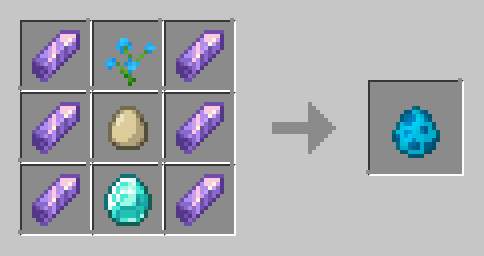
Allay Spawn Egg
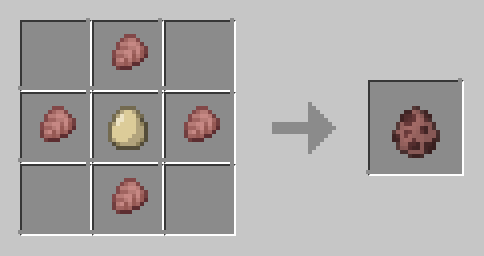
Armadillo Spawn Egg
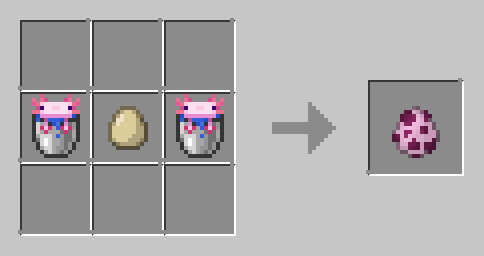
Axolotl Spawn Egg
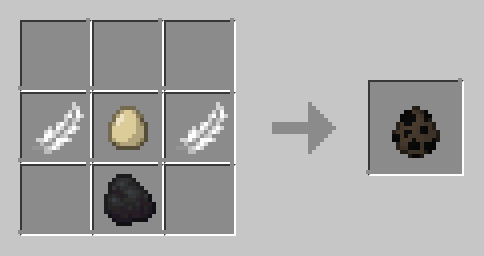
Bat Spawn Egg
Bee Spawn Egg
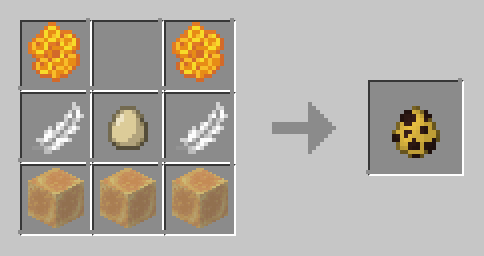
Blaze Spawn Egg
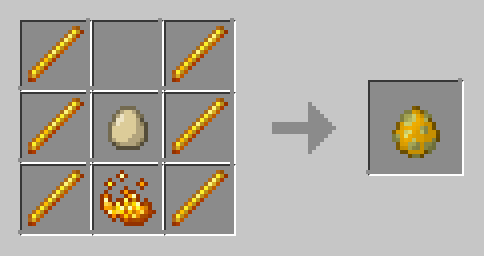
Bogged Spawn Egg
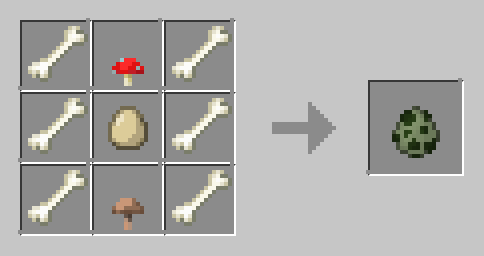
Breeze Spawn Egg

Camel Spawn Egg
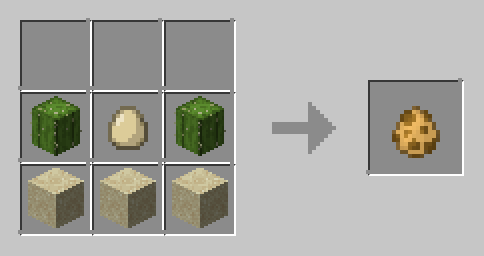
Cat Spawn Egg
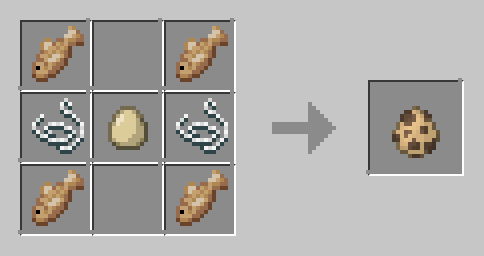
Cave Spider Spawn Egg
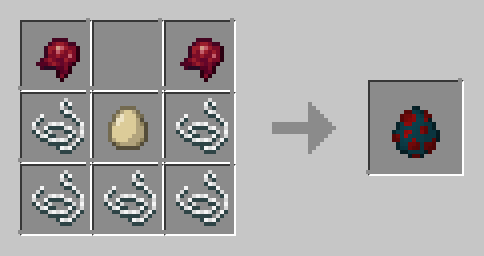
Chicken Spawn Egg
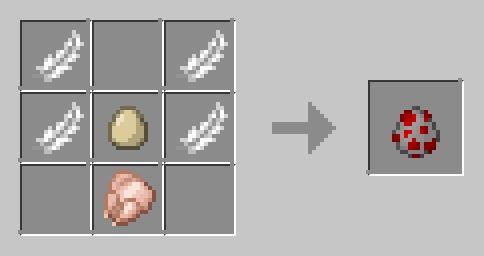
Cod Spawn Egg
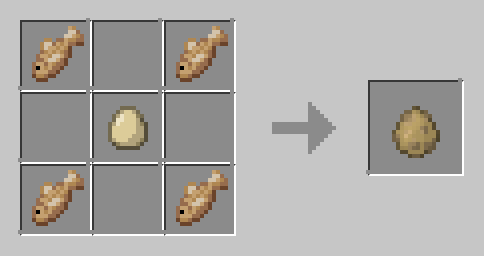
Copper Golem Spawn Egg

Cow Spawn Egg
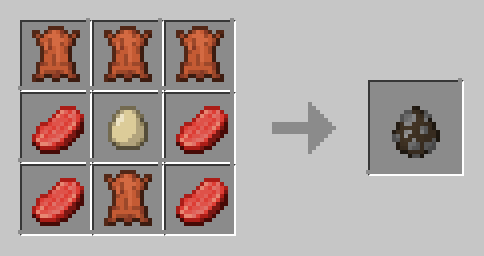
Creaking Spawn Egg
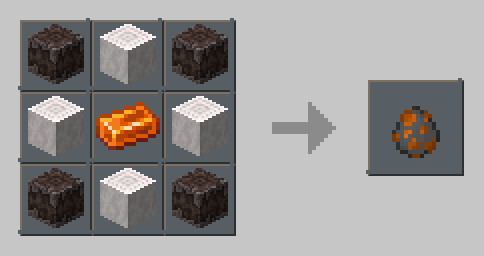
Creeper Spawn Egg
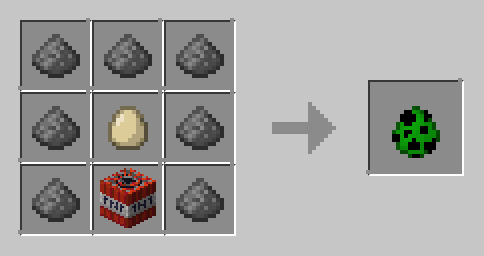
Dolphin Spawn Egg
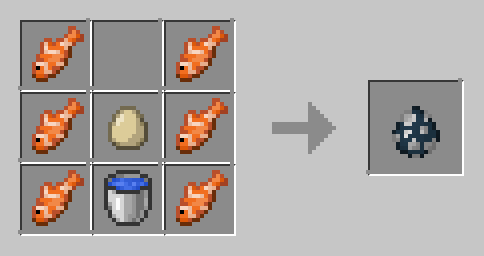
Donkey Spawn Egg
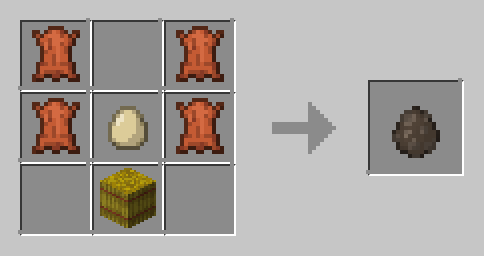
Drowned Spawn Egg
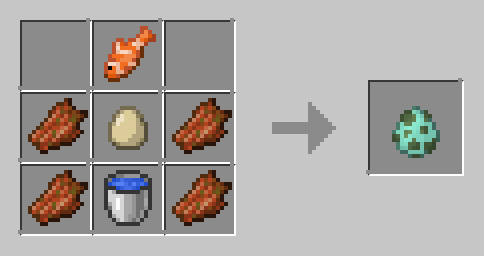
Elder Guardian Spawn Egg
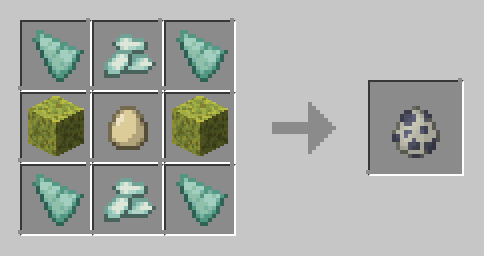
Ender Dragon Spawn Egg

Enderman Spawn Egg
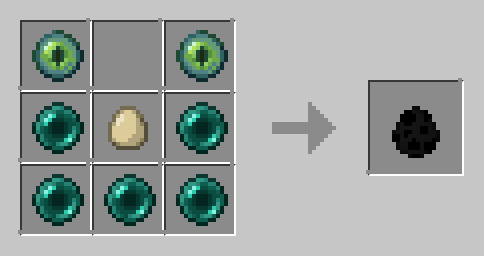
Endermite Spawn Egg
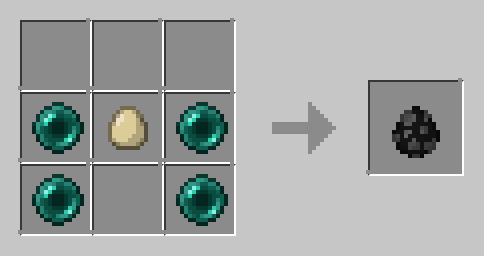
Evoker Spawn Egg
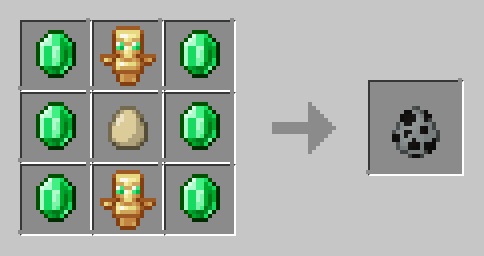
Fox Spawn Egg
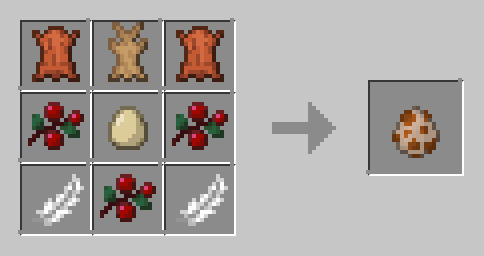
Frog Spawn Egg
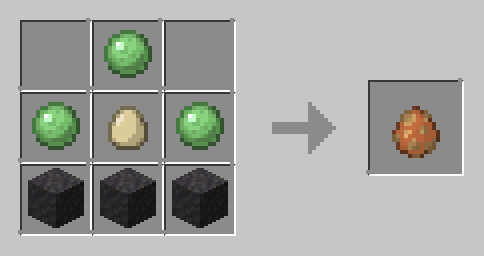
Ghast Spawn Egg
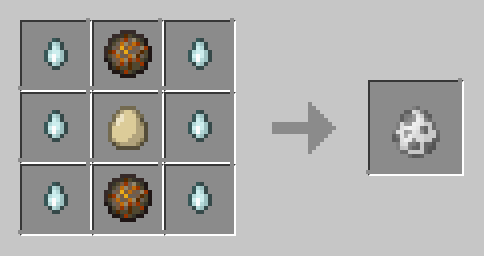
Glow Squid Spawn Egg
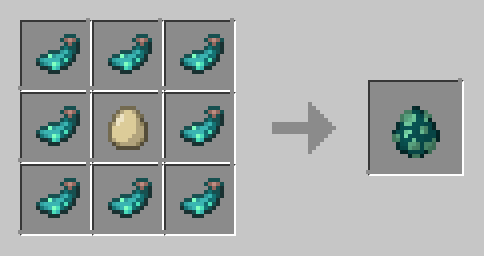
Goat Spawn Egg
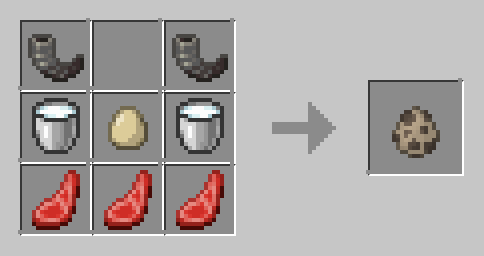
Guardian Spawn Egg
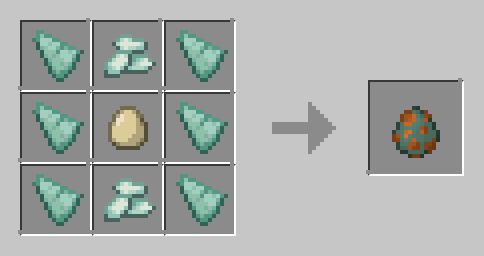
Hapy Ghast Spawn Egg
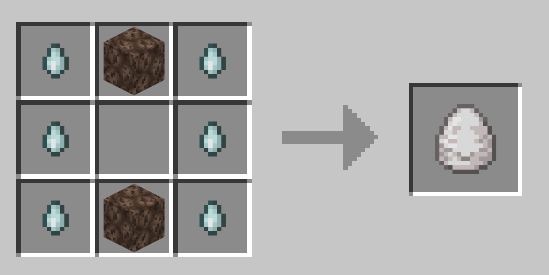
Hoglin Spawn Egg
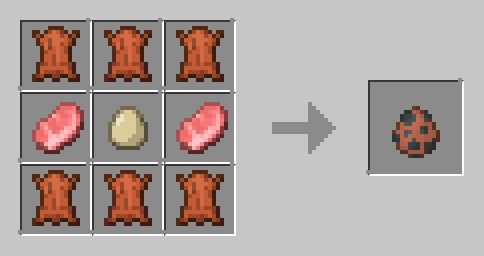
Horse Spawn Egg
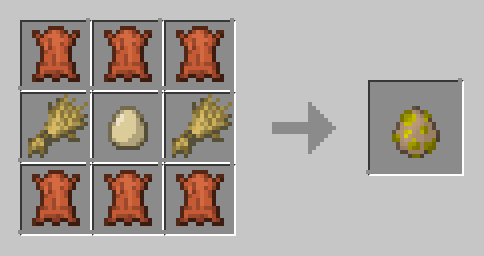
Husk Spawn Egg
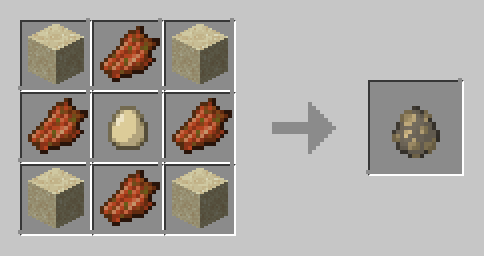
Iron Golem Spawn Egg
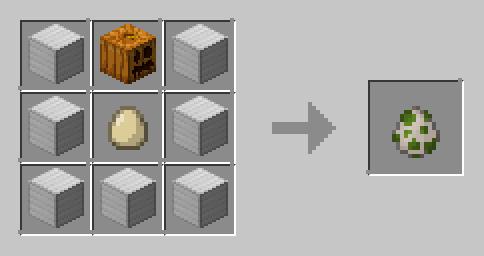
Llama Spawn Egg
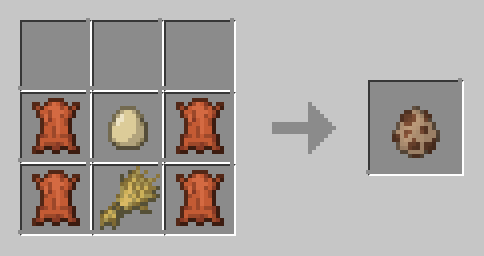
Magma Cube Spawn Egg
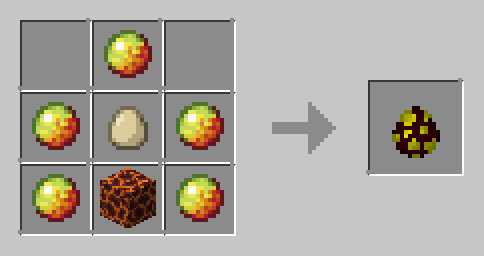
Mooshroom Spawn Egg
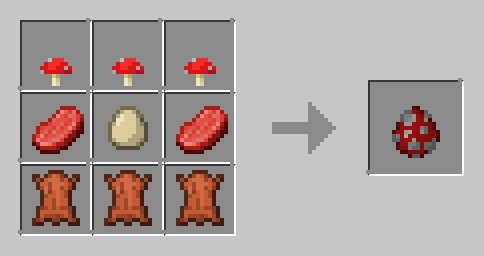
Mule Spawn Egg
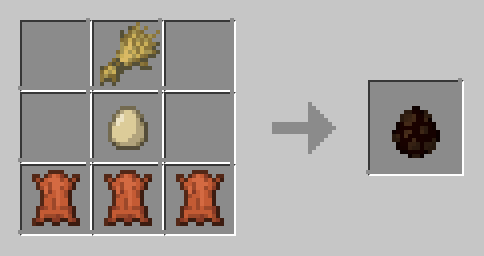
Ocelot Spawn Egg
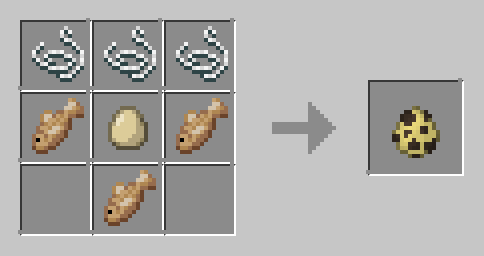
Panda Spawn Egg
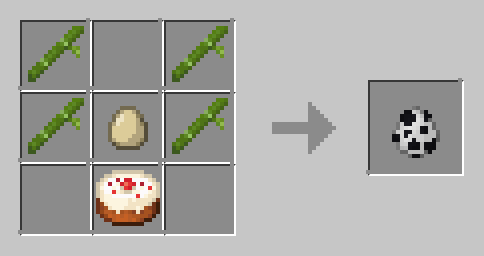
Parrot Spawn Egg
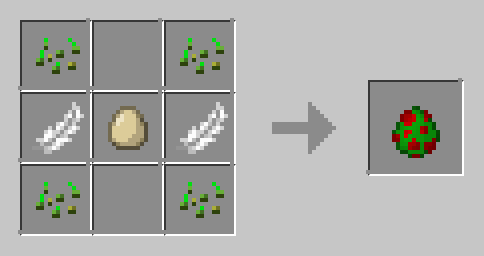
Phantom Spawn Egg
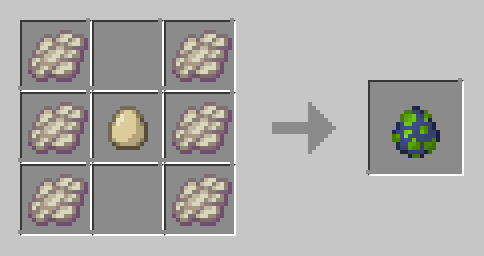
Pig Spawn Egg
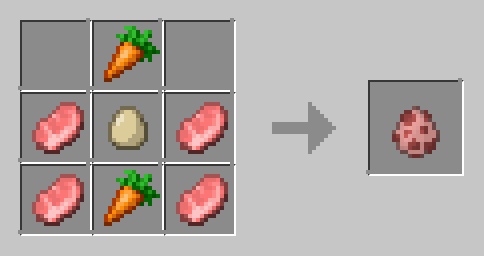
Piglin Spawn Egg
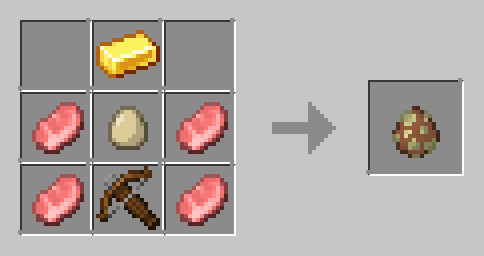
Piglin Brute Spawn Egg
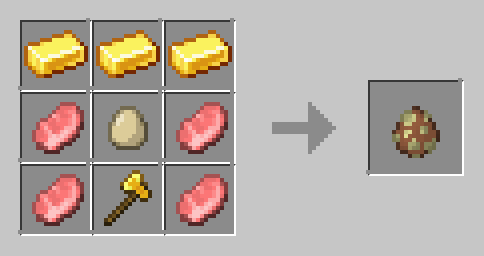
Pillager Spawn Egg
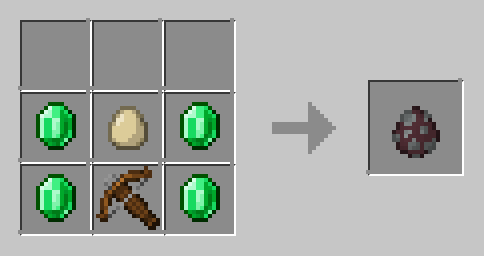
Polar Bear Spawn Egg
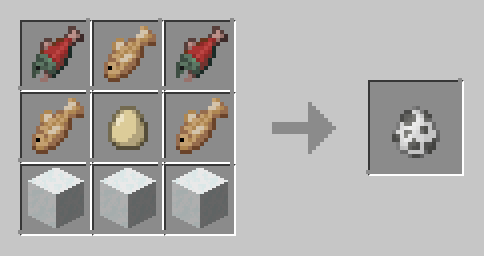
Pufferfish Spawn Egg
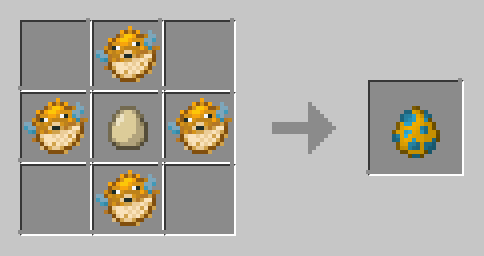
Rabbit Spawn Egg
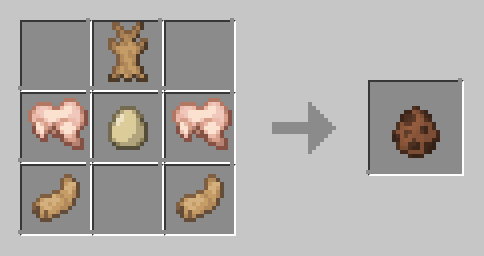
Ravager Spawn Egg
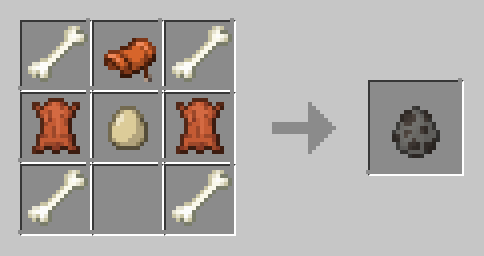
Salmon Spawn Egg
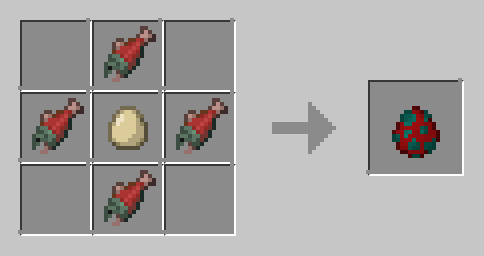
Sheep Spawn Egg
Any wool color works
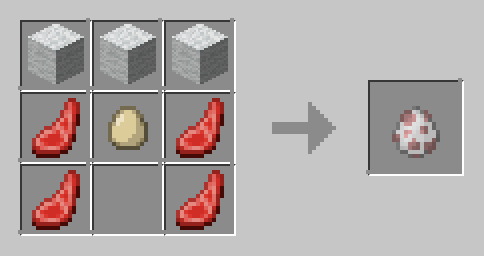
Shulker Spawn Egg
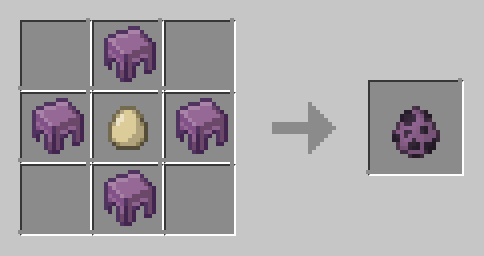
Silverfish Spawn Egg
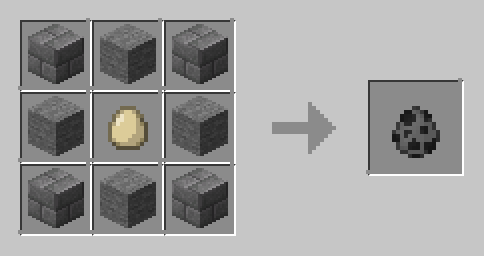
(normal stone brick)
Skeleton Spawn Egg
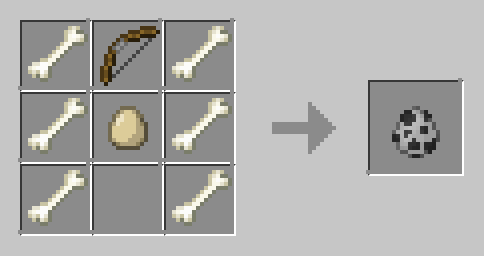
Skeleton Horse Spawn Egg
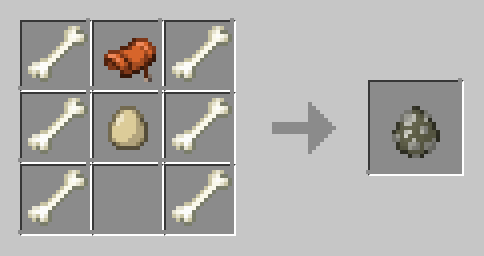
Slime Spawn Egg
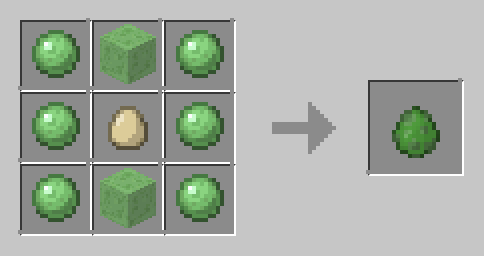
Sniffer Spawn Egg
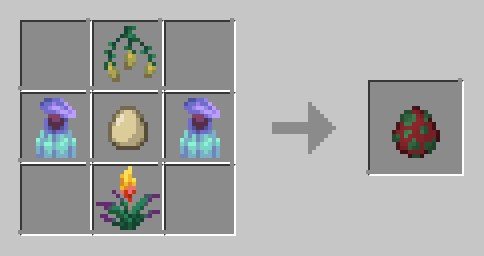
Snow Golem Spawn Egg
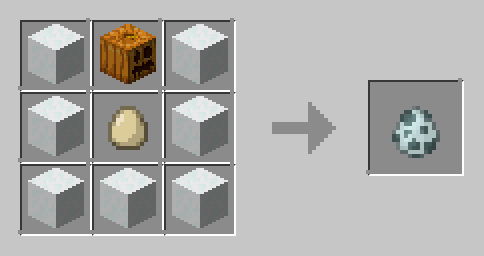
Spider Spawn Egg
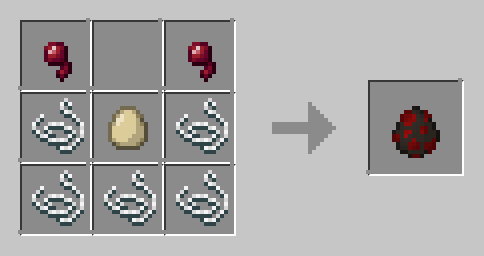
Squid Spawn Egg
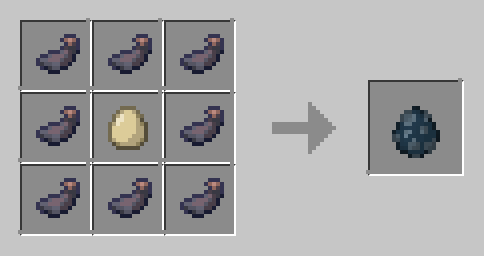
Stray Spawn Egg
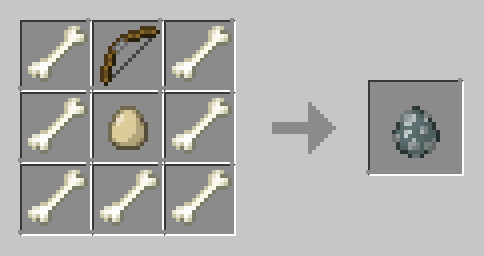
Strider Spawn Egg
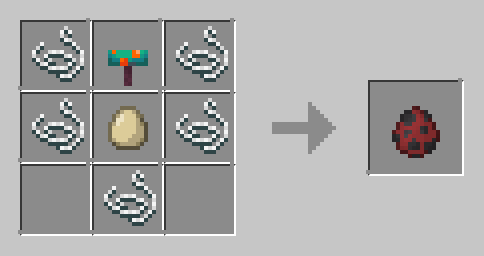
Strider Spawn Egg
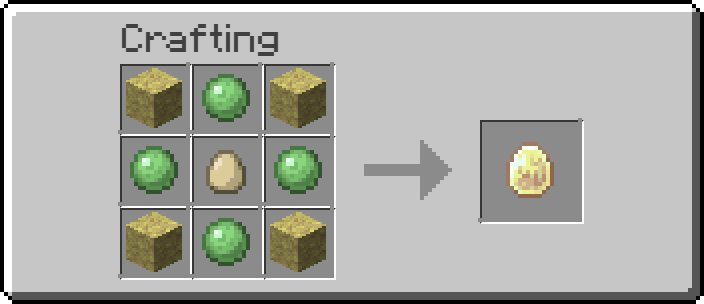
Tadpole Spawn Egg
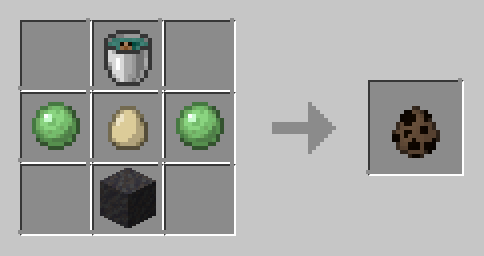
Trader Llama Spawn Egg
Any carpet color works
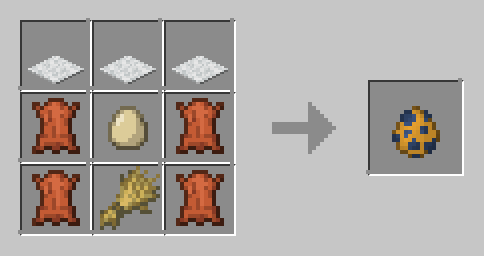
Tropical Fish Spawn Egg
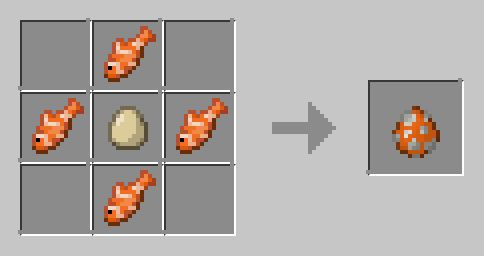
Turtle Spawn Egg
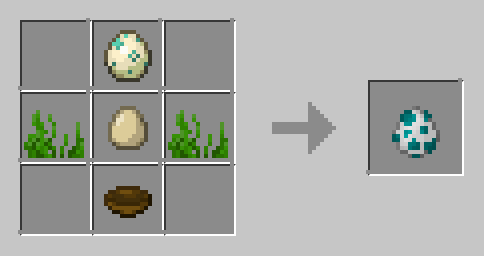
Vex Spawn Egg
added diamond to not make this too OP and annoying
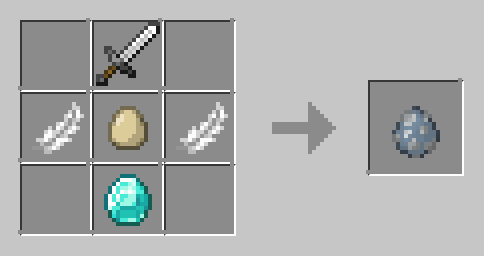
Villager Spawn Egg
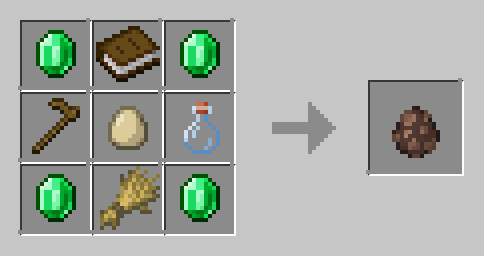
Vindicator Spawn Egg
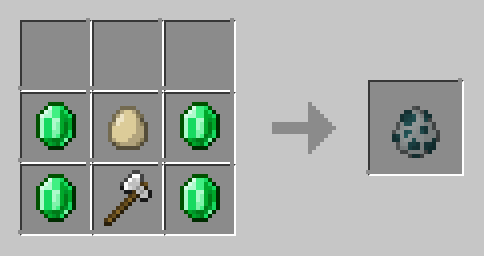
Wandering Trader Spawn Egg
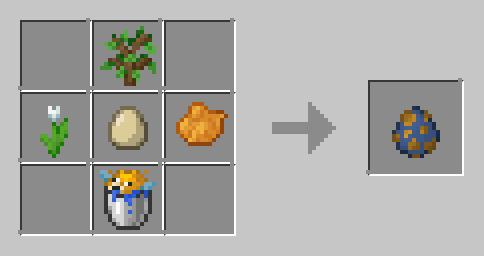
Warden Spawn Egg
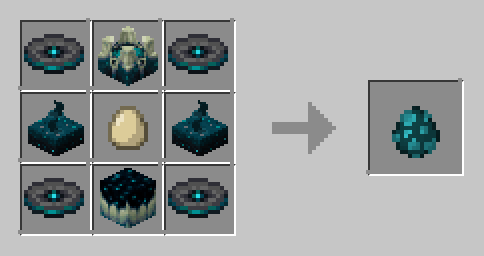
Witch Spawn Egg
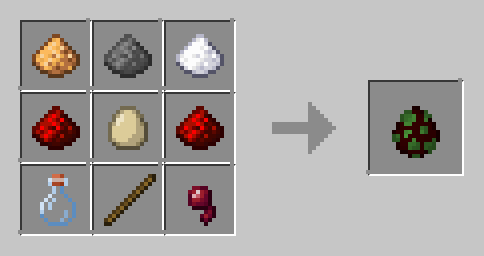
Wither Spawn Egg
Soul soil and soul sand works

Wither Skeleton Spawn Egg
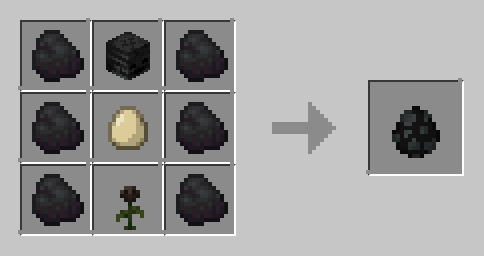
Wolf Spawn Egg
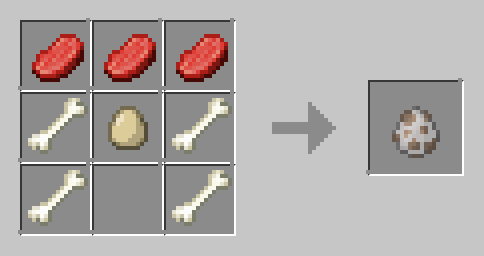
Zoglin Spawn Egg
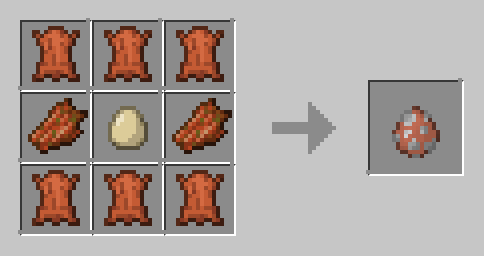
Zombie Spawn Egg
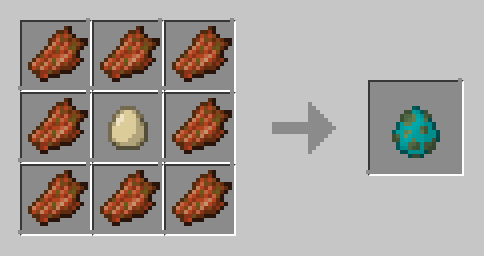
Zombie Horse Spawn Egg
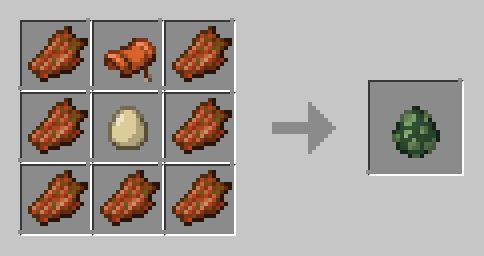
Zombie Villager Spawn Egg
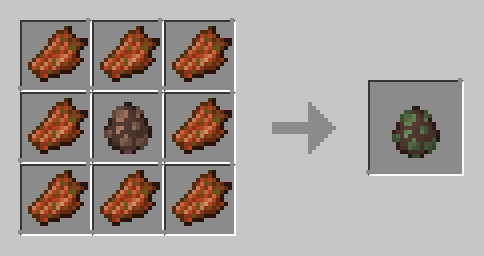
Zombiefied Piglin Spawn Egg
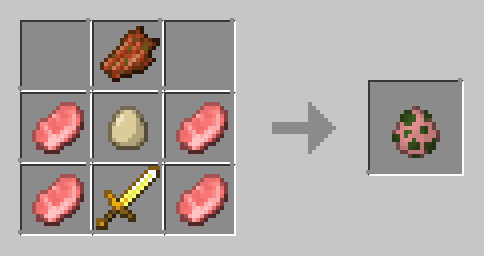
Guides
How to Install a Datapack in Singleplayer At the Creation of a World ### How to install a datapack in singleplayer 1. **Open Minecraft** Launch the game. 2. **Create a New World** Navigate to "More" and click on **"Data Packs"**. 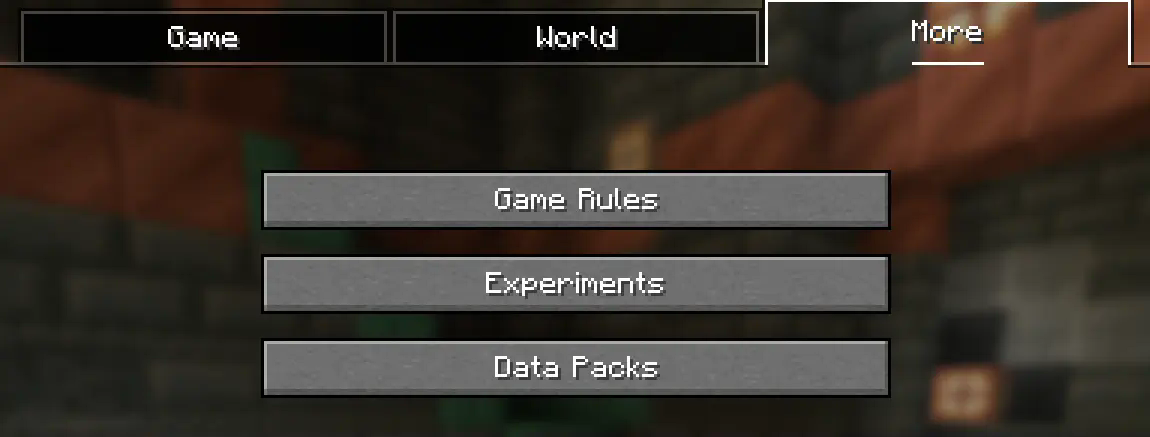 3. **Add the Datapack** Drag the datapack (a `.zip` file or directory) into the Minecraft window. - A confirmation screen will appear. Click **"Yes"**. 4. **Activate the Datapack** Move the datapack to the right-hand side of the screen by clicking the triangle on its icon (visible when hovering over it). 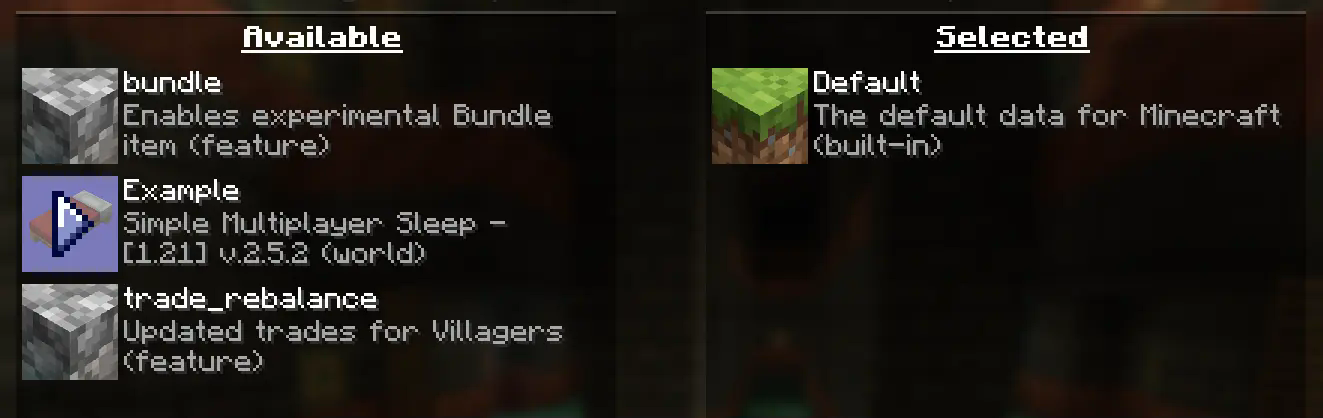 5. **Complete World Creation** - Click **"Done"** at the bottom of the screen. - Continue creating your world and click **"Create New World"**. --- ### ⚠️ IMPORTANT ⚠️ The datapack only works if cheats are enabled. You can verify the datapack is active by typing: `/datapack list enabled` This command should list an entry named `[file/]`. In an Existing World ### How to Install a Datapack in an Existing Singleplayer World 1. **Open Minecraft** Launch the game. 2. **Select Your World** - Choose the world you want to install the datapack for. - Click **"Edit"**, then **"Open World Folder"**. 3. **Add the Datapack** - Open the folder named `datapacks`. - Place the datapack into this folder. It should be a `.zip` file or a directory. 4. **Reload the World** - If you are in the world during installation, type `/reload` in the chat or press **F3 + T** to reload resources. *(Make sure cheats are enabled.)* --- ### ⚠️ IMPORTANT ⚠️ The datapack only works if cheats are enabled. You can verify the datapack is active by typing: `/datapack list enabled` How to Enable Cheats Permanently After World Creation If you encounter this issue, here is a step by step guide on how to enable Cheats/Admincommands permanently after you have already created a Minecraft world. ⚠️ **Before you begin, you should save and backup your world in case something goes wrong.** (I will not take any responsibility for any corrupt worlds. Do this at your own risk!) But don't worry this works without any problems. If you don't want to change this permanently check out [this guide](#). ### 1. You need [NBTExplorer](https://github.com/jaquadro/NBTExplorer/releases/tag/v2.8.0-win) > NBTExplorer is an open-source NBT editor for all common sources of NBT data. It's mainly intended for editing Minecraft game data. ### 2. Open NBTExplorer and open your Minecraft world, where you want to enable Cheats/Admincommands.  ### 3. Navigate to: - `` - `level.dat` - `Data` - `allowCommands`  ### 4. Click on **"Edit Tag Value"**  ### 5. Change the Value from `0` to `1` and click **"OK"**  ### 6. Now click on **"Save All Modified Tags"**  That's it. You are done. You can now join your world and check if you have permission to change your `gamemode`, for example. How to Enable Cheats Temporarily After World Creation ### Enabling Cheats Temporarily After World Creation If you encounter this issue, here is a step-by-step guide on how to enable Cheats/Admin commands temporarily after you have already created a Minecraft world. 1. **Join Your World** Open your single-player world and press "Escape". 2. **Open to LAN** Click on **"Open to LAN"**. 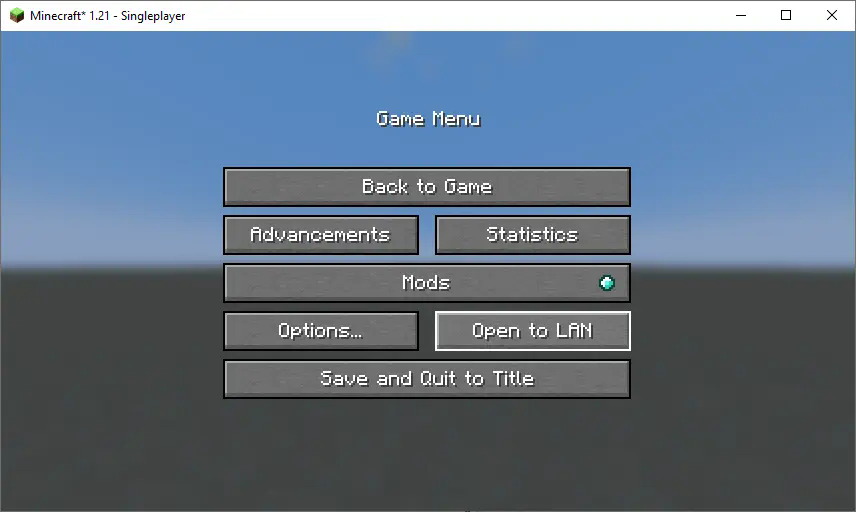 3. **Allow Commands** Set **"Allow Commands"** to **ON**. 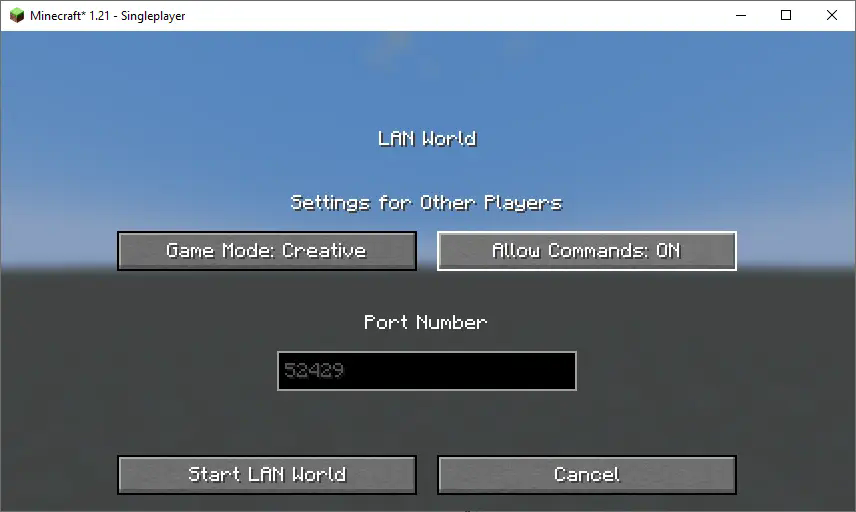 4. **Start LAN World** Click **"Start LAN World"** to apply the changes. 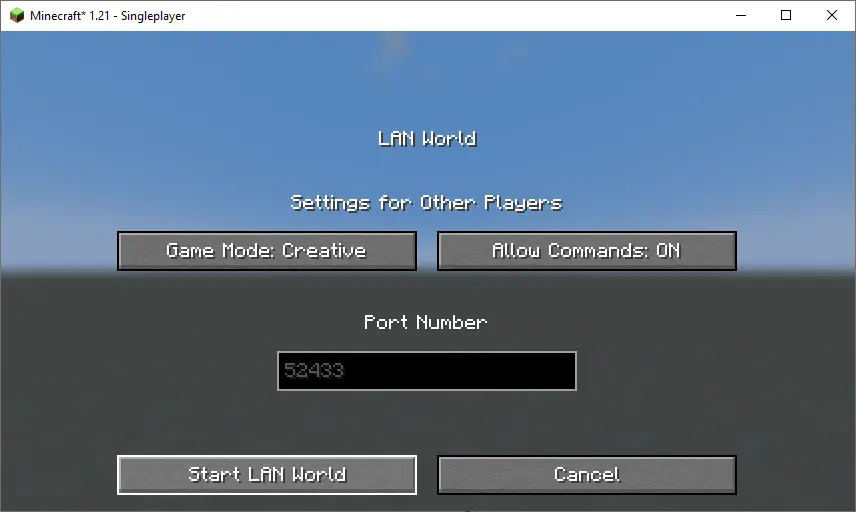 Now, you should be able to use commands like changing your gamemode. Keep in mind that this is only temporary and will need to be done every time you join the world. How to Install a Datapack in Multiplayer ### How to Install a Datapack in Multiplayer 1. **Open Your Server Folder** Navigate to your server folder, then open the folder for the world you wish to install the datapack in (default: `world`). 2. **Add the Datapack** - The datapack should be a `.zip` file. - Place the datapack into a folder named `datapacks` inside the world folder. 3. **Reload the Server** - Type `/reload` from the console or as a level 3 operator if the server was running during the installation. How to Uninstall a Datapack ### How to Uninstall a Datapack from Your Singleplayer World or Server 1. **Run the Uninstall Command** For my datapacks, run the command: `/function datapack_name:uninstall` 2. **Delete the Datapack** - Delete the datapack from the folder you placed it in. - Alternatively, you can run: `/datapack disable [file/your data pack file/directory name]` 3. **Reload the World or Server** After deleting or disabling the datapack, run: `/reload` How to Install a Mod on a Minecraft Server ### Step-by-Step Guide to Installing a Mod on a Minecraft Server 1. **Download the Mod** - Make sure to download the **correct version** of the Mod that matches your server's Minecraft version. - **Important:** The mod file should be a `.jar` file. 2. **Ensure No Datapacks or Other Mods Conflict** - Do not have both a datapack and a mod installed at the same time, as they may conflict. - Only install one or the other, depending on your server's setup. 3. **Locate the Mods Folder** - Open your server's root directory. - Inside this directory, find the folder named `mods`. - If the `mods` folder doesn't exist, create one. 4. **Install the Mod** - Paste the downloaded `.jar` file for the Mod into the `mods` folder. 5. **Restart the Server** - After adding the Mod to the `mods` folder, restart your Minecraft server for the mod to be activated. 6. **Verify Mod Installation** - Once the server has restarted, join the server and check if the Mod is working. - You can use `/mods` or a similar command (depending on the mod) to see if the Mod has been successfully loaded. ### Additional Tips - **Backup Your Server:** Always create a backup before installing the Mod to avoid data loss in case something goes wrong. - **Ensure Mod Compatibility:** Check that the Mod is compatible with your Minecraft server version and any other mods you have installed.请登录后举报
请 登录 后赞助作者。
暂无评论,抢个沙发吧~