
Hudifine
作者:rebot | 分类:模组
Minecraft 版本: 26.2
平台: fabric
标签: decoration game-mechanics library
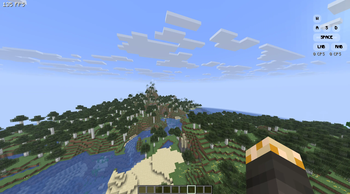
Hudifine is an HUD mod that allows anyone to make HUDs easily via HUD Script, which displays the metrics you choose.
Open the chat up to add and configure them.
Below is a documentation for HUDScript, the scripting language of Hudifine.
HUDScript Documentation # HUD Script Developer Documentation > **HUD Script** is a safe, sandboxed scripting format for creating fully customizable in-game HUD overlays in Minecraft (Fabric). Scripts are paste-and-run; no mod dev environment required. --- ## Table of Contents 1. Overview 2. Script Structure 3. Screen Budget (30% Rule) 4. Data Sources - Player - World - Performance - Combat - Inventory - Input - Environment - Game State - Multiplayer - Time 5. Layout System - Ordering & Layering 6. Styling 7. Elements 8. Conditionals & Logic 9. Events 10. Accessibility Toggles 11. Player Settings API 12. Animations 13. CPS Implementation Guide 14. Full Examples --- ## Overview HUD Script is a **declarative + event-driven** scripting format. Scripts define: - What data to display (from a fixed set of allowed data sources) - How to display it (full visual freedom within the screen budget) - Player-configurable settings (accessibility, toggles, colors, etc.) Scripts are **sandboxed by design**. They can only: - ✅ Read from allowed data sources - ✅ Render to the HUD overlay - ✅ React to player input visually - ❌ Make network requests - ❌ Access the file system - ❌ Interact with anything outside the widget --- ## Script Structure Every script has three optional top-level blocks: ```hud meta { name: "My Widget" author: "yourname" version: "1.0.0" description: "A short description of what this widget does." } settings { // Player-configurable options exposed in the right-click menu } widget { // Layout, elements, styling, logic } ``` Only the `widget` block is required. --- ## Screen Budget (30% Rule) A widget may occupy **no more than 30% of the player's screen area** at any time. - Screen area is calculated as `screenWidth × screenHeight` - Your widget's bounding box (all elements combined) must not exceed `screenWidth × screenHeight × 0.30` - This is enforced at runtime; if your widget exceeds 30%, it will be scaled down automatically and a warning will appear in the widget editor - Widgets that are toggled off or fully transparent do **not** count toward the budget - Multiple widgets each have their own 30% budget independently > **Tip:** Use the `size` property wisely and test at different resolutions. Design for 1920×1080 as your baseline. --- ## Data Sources All data sources are read-only. Call them inside element values using `get()`. ### Player | Source | Returns | Description | |--------|---------|-------------| | `player.health` | `float` | Current health (0.0–20.0) | | `player.maxHealth` | `float` | Max health including absorption | | `player.absorption` | `float` | Absorption hearts | | `player.hunger` | `int` | Food level (0–20) | | `player.saturation` | `float` | Saturation level (0.0–20.0) | | `player.exhaustion` | `float` | Exhaustion value (0.0–4.0) | | `player.air` | `int` | Air supply ticks (0–300) | | `player.xp` | `int` | Total XP points | | `player.xpLevel` | `int` | Current XP level | | `player.xpProgress` | `float` | XP progress to next level (0.0–1.0) | | `player.speed` | `float` | Current movement speed (blocks/sec) | | `player.isSprinting` | `bool` | Whether player is sprinting | | `player.isSneaking` | `bool` | Whether player is sneaking | | `player.isSwimming` | `bool` | Whether player is swimming | | `player.isFlying` | `bool` | Whether player is flying (creative/elytra) | | `player.isFalling` | `bool` | Whether player is falling | | `player.isOnGround` | `bool` | Whether player is on the ground | | `player.isInWater` | `bool` | Whether player is in water | | `player.isInLava` | `bool` | Whether player is in lava | | `player.fallDistance` | `float` | Current fall distance in blocks | | `player.reachDistance` | `float` | Current reach distance | | `player.name` | `string` | Player's username | | `player.uuid` | `string` | Player UUID | | `player.gamemode` | `string` | `survival`, `creative`, `adventure`, `spectator` | | `player.score` | `int` | Player's current scoreboard score | | `player.ping` | `int` | Latency in ms (multiplayer only) | ### World | Source | Returns | Description | |--------|---------|-------------| | `world.x` | `float` | Player X coordinate | | `world.y` | `float` | Player Y coordinate | | `world.z` | `float` | Player Z coordinate | | `world.blockX` | `int` | Player block X (floored) | | `world.blockY` | `int` | Player block Y (floored) | | `world.blockZ` | `int` | Player block Z (floored) | | `world.chunkX` | `int` | Current chunk X | | `world.chunkZ` | `int` | Current chunk Z | | `world.facing` | `string` | Cardinal direction: `N`, `NE`, `E`, `SE`, `S`, `SW`, `W`, `NW` | | `world.facingDegrees` | `float` | Yaw in degrees (0–360) | | `world.pitch` | `float` | Camera pitch (-90 to 90) | | `world.yaw` | `float` | Camera yaw (0–360) | | `world.dimension` | `string` | `overworld`, `nether`, `end`, or custom namespace | | `world.biome` | `string` | Current biome name (e.g. `minecraft:plains`) | | `world.lightLevel` | `int` | Block light level at player feet (0–15) | | `world.skyLightLevel` | `int` | Sky light level at player position (0–15) | | `world.moonPhase` | `int` | Moon phase (0–7) | | `world.isRaining` | `bool` | Whether it is raining | | `world.isThundering` | `bool` | Whether there is a thunderstorm | | `world.rainStrength` | `float` | Rain intensity (0.0–1.0) | | `world.difficulty` | `string` | `peaceful`, `easy`, `normal`, `hard` | | `world.name` | `string` | World/server name | | `world.seed` | `string` | World seed (singleplayer only, returns `"hidden"` on servers) | | `world.spawnX` | `int` | World spawn X | | `world.spawnZ` | `int` | World spawn Z | | `world.distanceToSpawn` | `float` | Distance to world spawn in blocks | ### Performance | Source | Returns | Description | |--------|---------|-------------| | `perf.fps` | `int` | Current frames per second | | `perf.fpsAvg` | `float` | Average FPS over last 5 seconds | | `perf.fpsMin` | `int` | Minimum FPS over last 5 seconds | | `perf.fpsMax` | `int` | Maximum FPS over last 5 seconds | | `perf.frameTime` | `float` | Last frame time in milliseconds | | `perf.frameTimeAvg` | `float` | Average frame time over last 5 seconds | | `perf.tps` | `float` | Server ticks per second (multiplayer only) | | `perf.mspt` | `float` | Milliseconds per tick (server, multiplayer only) | | `perf.chunkUpdates` | `int` | Chunk updates this frame | | `perf.renderedChunks` | `int` | Number of rendered chunks | | `perf.entities` | `int` | Entities in render distance | | `perf.blockEntities` | `int` | Block entities in render distance | | `perf.particles` | `int` | Active particles | ### Combat | Source | Returns | Description | |--------|---------|-------------| | `combat.attackCooldown` | `float` | Attack cooldown progress (0.0–1.0) | | `combat.attackCooldownMs` | `int` | Milliseconds until full attack cooldown | | `combat.isAttacking` | `bool` | Whether player is currently attacking | | `combat.lastDamage` | `float` | Last damage received | | `combat.lastDamageSource` | `string` | Source of last damage (e.g. `fire`, `fall`, `player`) | | `combat.killCount` | `int` | Player kills this session | | `combat.deathCount` | `int` | Player deaths this session | | `combat.kdr` | `float` | Kill/death ratio this session | | `combat.targetName` | `string` | Name of entity player is looking at (if any) | | `combat.targetHealth` | `float` | Health of entity player is looking at | | `combat.targetMaxHealth` | `float` | Max health of entity player is looking at | | `combat.targetDistance` | `float` | Distance to targeted entity | | `combat.targetType` | `string` | Type of entity player is looking at | | `combat.isInCombat` | `bool` | Whether player has been hit/hit something recently | | `combat.combatTimer` | `int` | Seconds since last combat action | ### Inventory | Source | Returns | Description | |--------|---------|-------------| | `inventory.hotbarSlot` | `int` | Current hotbar slot (0–8) | | `inventory.mainHandItem` | `string` | Item ID in main hand | | `inventory.mainHandCount` | `int` | Stack count in main hand | | `inventory.mainHandDurability` | `int` | Durability of main hand item | | `inventory.mainHandMaxDurability` | `int` | Max durability of main hand item | | `inventory.mainHandDurabilityPct` | `float` | Durability % of main hand item (0.0–1.0) | | `inventory.offHandItem` | `string` | Item ID in off hand | | `inventory.offHandCount` | `int` | Stack count in off hand | | `inventory.offHandDurability` | `int` | Durability of off hand item | | `inventory.helmetItem` | `string` | Item ID of helmet | | `inventory.helmetDurability` | `int` | Durability of helmet | | `inventory.helmetDurabilityPct` | `float` | Durability % of helmet (0.0–1.0) | | `inventory.chestplateItem` | `string` | Item ID of chestplate | | `inventory.chestplateDurability` | `int` | Durability of chestplate | | `inventory.chestplateDurabilityPct` | `float` | Durability % of chestplate (0.0–1.0) | | `inventory.leggingsItem` | `string` | Item ID of leggings | | `inventory.legginsDurability` | `int` | Durability of leggings | | `inventory.leggingsDurabilityPct` | `float` | Durability % of leggings (0.0–1.0) | | `inventory.bootsItem` | `string` | Item ID of boots | | `inventory.bootsDurability` | `int` | Durability of boots | | `inventory.bootsDurabilityPct` | `float` | Durability % of boots (0.0–1.0) | | `inventory.arrowCount` | `int` | Number of arrows in inventory | | `inventory.totalSlots` | `int` | Total inventory slots (36) | | `inventory.usedSlots` | `int` | Number of filled inventory slots | | `inventory.emptySlots` | `int` | Number of empty inventory slots | | `inventory.xpBottleCount` | `int` | XP bottles in inventory | ### Input > Input sources reflect what the player is **physically pressing**. They are display-only; you cannot intercept, block, or redirect input. | Source | Returns | Description | |--------|---------|-------------| | `input.forward` | `bool` | W key held | | `input.backward` | `bool` | S key held | | `input.left` | `bool` | A key held | | `input.right` | `bool` | D key held | | `input.jump` | `bool` | Space held | | `input.sneak` | `bool` | Shift held | | `input.sprint` | `bool` | Sprint key held | | `input.attack` | `bool` | Left mouse button held | | `input.use` | `bool` | Right mouse button held | | `input.drop` | `bool` | Q key held | | `input.inventory` | `bool` | Inventory key held | | `input.swap` | `bool` | F key (swap hands) held | | `input.hotbar1`–`input.hotbar9` | `bool` | Hotbar slot keys held | | `input.cps` | `int` | Left click CPS (clicks per second) | | `input.rcps` | `int` | Right click CPS | | `input.mouseX` | `int` | Mouse X position on screen | | `input.mouseY` | `int` | Mouse Y position on screen | | `input.mouseDeltaX` | `float` | Mouse X movement this frame | | `input.mouseDeltaY` | `float` | Mouse Y movement this frame | | `input.sensitivity` | `float` | Current mouse sensitivity (0.0–1.0) | ### Environment | Source | Returns | Description | |--------|---------|-------------| | `env.timeOfDay` | `int` | World ticks (0–24000) | | `env.timeString` | `string` | Formatted time (e.g. `6:00 AM`) | | `env.dayCount` | `int` | In-game days elapsed | | `env.temperature` | `float` | Biome temperature at player position | | `env.humidity` | `float` | Biome humidity at player position | | `env.canSeeSky` | `bool` | Whether player has line of sight to sky | | `env.isUnderground` | `bool` | Whether player is underground (no sky access) | | `env.nearestVillageDistance` | `float` | Distance to nearest detected village (blocks) | | `env.isInVillage` | `bool` | Whether player is inside a village | | `env.nearestPlayerDistance` | `float` | Distance to nearest other player (multiplayer) | | `env.nearestPlayerName` | `string` | Name of nearest other player | ### Game State | Source | Returns | Description | |--------|---------|-------------| | `game.isPaused` | `bool` | Whether the game is paused | | `game.isInGui` | `bool` | Whether any GUI is open | | `game.isInventoryOpen` | `bool` | Whether inventory is open | | `game.isInBed` | `bool` | Whether player is sleeping | | `game.isRiding` | `bool` | Whether player is riding an entity | | `game.ridingEntityType` | `string` | Type of entity being ridden | | `game.ridingEntityHealth` | `float` | Health of entity being ridden | | `game.isElytraFlying` | `bool` | Whether player is elytra flying | | `game.elytraHealth` | `int` | Current elytra durability | | `game.elytraSpeed` | `float` | Current elytra speed (blocks/sec) | | `game.potionEffects` | `list` | Active potion effect IDs | | `game.potionEffectAmplifiers` | `map` | Amplifier per active effect | | `game.potionEffectDurations` | `map` | Duration ticks per active effect | | `game.scoreboardObjective` | `string` | Current sidebar scoreboard objective name | | `game.scoreboardScore` | `int` | Player's score on current sidebar objective | | `game.bossBarName` | `string` | Name of active boss bar (if any) | | `game.bossBarProgress` | `float` | Boss bar progress (0.0–1.0) | | `game.isSpectatingEntity` | `bool` | Whether player is spectating an entity | | `game.spectatingEntityType` | `string` | Type of entity being spectated | ### Multiplayer | Source | Returns | Description | |--------|---------|-------------| | `server.name` | `string` | Server name / IP | | `server.motd` | `string` | Server MOTD | | `server.playerCount` | `int` | Current online player count | | `server.maxPlayers` | `int` | Server max player capacity | | `server.ping` | `int` | Ping to server in ms | | `server.tps` | `float` | Server TPS | | `server.isLAN` | `bool` | Whether connected to LAN server | | `server.isSingleplayer` | `bool` | Whether in singleplayer | | `server.version` | `string` | Server Minecraft version | ### Time | Source | Returns | Description | |--------|---------|-------------| | `clock.hour` | `int` | Real-world hour (0–23) | | `clock.minute` | `int` | Real-world minute (0–59) | | `clock.second` | `int` | Real-world second (0–59) | | `clock.timeString` | `string` | Formatted real time (e.g. `14:32`) | | `clock.timeString12` | `string` | 12-hour format (e.g. `2:32 PM`) | | `clock.sessionTime` | `int` | Seconds in current play session | | `clock.sessionTimeString` | `string` | Formatted session time (e.g. `1h 23m`) | | `clock.date` | `string` | Real-world date (e.g. `2025-04-26`) | | `clock.unixTimestamp` | `int` | Unix timestamp (seconds) | --- ## Layout System Widgets use a simple box-based layout anchored to screen positions. ### Anchor Points ```hud widget { anchor: top-left // top-left, top-center, top-right // middle-left, center, middle-right // bottom-left, bottom-center, bottom-right offsetX: 10 // Pixel offset from anchor X (can be negative) offsetY: 10 // Pixel offset from anchor Y (can be negative) } ``` ### Sizing ```hud widget { width: 120 // Fixed pixel width height: auto // "auto" sizes to content, or fixed pixels padding: 8 // Uniform padding (or padding: 8 4 for vertical/horizontal) margin: 4 // Outer margin } ``` ### Direction ```hud widget { direction: column // "column" (vertical stack) or "row" (horizontal stack) gap: 4 // Gap between child elements in pixels align: start // "start", "center", "end" — cross-axis alignment justify: start // "start", "center", "end", "space-between" — main axis } ``` ### Z-Index ```hud widget { zIndex: 10 // Higher values render on top of other widgets } ``` --- ### Ordering & Layering By default, elements render in the order they are written in the script, top to bottom. You can override this with the `order` property on any element or group. ```hud widget { direction: column text { value: "I appear second" order: 2 color: #ffffff fontSize: 12 } text { value: "I appear first" order: 1 color: #aaaaaa fontSize: 10 } text { value: "I appear third" order: 3 color: #555555 fontSize: 9 } } ``` `order` works like CSS order; lower numbers render first (higher up or further left depending on `direction`). Elements without an `order` value default to `order: 0` and render before explicitly ordered ones. You can also use `order` inside a `group`: ```hud group { direction: row text { value: "CPS" order: 2 color: #aaaaaa fontSize: 9 } keyIndicator { key: input.attack label: "LMB" order: 1 size: 20 borderRadius: 8 activeColor: #ffffff inactiveColor: #ffffff33 } } ``` > **Tip:** Use `order` when you want your script logic grouped together but the visual layout to differ. If everything has an explicit order, it's cleaner to just rewrite the script in the correct order instead. --- ## Styling ### Background ```hud widget { background: #00000088 // Hex color with optional alpha (last 2 digits) background: transparent // No background borderRadius: 6 // Rounded corners in pixels border: 1 #ffffff44 // Border: width color backdropBlur: 4 // Blur pixels behind widget (GPU-dependent) } ``` ### Text Styling ```hud text { value: get(player.health) color: #ffffff fontSize: 12 // In pixels (8–32 recommended) fontWeight: bold // "normal", "bold" fontStyle: normal // "normal", "italic" shadow: true // Minecraft-style text shadow shadowColor: #00000066 letterSpacing: 0 // Pixels between characters lineHeight: 1.2 // Line height multiplier align: left // "left", "center", "right" truncate: 20 // Max characters before truncation (optional) uppercase: false // Force uppercase } ``` ### Colors Colors are hex strings: `#RRGGBB` or `#RRGGBBAA` (with alpha). ```hud color: #ff0000 // Red, fully opaque color: #ff000088 // Red, 50% transparent color: #fff // Shorthand (expands to #ffffff) ``` ### Opacity ```hud widget { opacity: 0.8 // 0.0 (invisible) to 1.0 (fully opaque) } ``` --- ## Elements Elements are the visual building blocks inside a `widget` block. ### `text` Displays a string value. ```hud text { value: "FPS: {get(perf.fps)}" // Inline expressions with {} color: #ffffff fontSize: 12 shadow: true } ``` ### `bar` A fill bar (health, XP, cooldown, etc.) ```hud bar { value: get(player.health) max: get(player.maxHealth) width: 100 height: 8 fillColor: #ff4444 backgroundColor: #00000066 borderRadius: 4 direction: left-to-right // "left-to-right", "right-to-left", "bottom-to-top", "top-to-bottom" } ``` ### `icon` Renders a Minecraft item or block icon. ```hud icon { item: get(inventory.mainHandItem) // Item ID string size: 16 // Icon size in pixels } ``` ### `circle` A circular progress indicator. ```hud circle { value: get(combat.attackCooldown) // 0.0–1.0 radius: 12 strokeWidth: 3 color: #ffffff backgroundColor: #ffffff33 startAngle: -90 // Degrees — 0 = right, -90 = top direction: clockwise // "clockwise" or "counterclockwise" } ``` ### `image` Renders a static texture from the resource pack. ```hud image { texture: "hud:textures/my_icon.png" // Namespace:path within resource pack width: 16 height: 16 tint: #ffffff // Optional color tint } ``` ### `keyIndicator` Displays a visual key that lights up when pressed. ```hud keyIndicator { key: input.forward label: "W" activeColor: #ffffff inactiveColor: #ffffff44 size: 20 // Width and height of the key in pixels width: 20 // Override width only (useful for SPACE, LMB, RMB) borderRadius: 8 // Higher = more rounded. Use 999 for a full pill shape fontSize: 9 // Label font size inside the key shadow: true // Text shadow on label } ``` > **Tip:** For wide keys like SPACE, LMB, and RMB, set `width` larger than `size` to stretch them horizontally while keeping the same height. A `borderRadius` of `8`–`12` matches the Lunar Client look. ### `group` Container to group and nest elements together. ```hud group { direction: row gap: 4 background: #00000066 padding: 6 borderRadius: 4 text { value: "Health: " color: #aaaaaa fontSize: 11 } text { value: "{get(player.health)}" color: #ff4444 fontSize: 11 } } ``` ### `separator` A horizontal or vertical divider line. ```hud separator { direction: horizontal // "horizontal" or "vertical" color: #ffffff22 thickness: 1 length: 80 // Pixels, or "auto" to fill available space margin: 4 } ``` ### `spacer` Empty space between elements. ```hud spacer { size: 8 } ``` --- ## Conditionals & Logic ### `if` / `else` Show or hide elements based on conditions. ```hud if get(player.health) `, `=`, `&&`, `||`, `!` ```hud if get(world.dimension) == "nether" && get(player.health) This section is for **Hudifine mod developers** implementing the `input.cps` and `input.rcps` data sources on the Java side. CPS (clicks per second) is not a value Minecraft tracks natively. You need to implement a click counter using a sliding time window. ### How it works Track every left click (attack) and right click (use) with a timestamp. To get the current CPS, count how many clicks happened in the last 1000ms. ### Recommended Java implementation (Fabric + Mixin) **Step 1 - Store click timestamps** ```java // In your HudifineDataProvider or equivalent class private static final List leftClickTimes = new ArrayList(); private static final List rightClickTimes = new ArrayList(); public static void registerLeftClick() { long now = System.currentTimeMillis(); leftClickTimes.add(now); // Prune old entries older than 1 second leftClickTimes.removeIf(t -> now - t > 1000); } public static void registerRightClick() { long now = System.currentTimeMillis(); rightClickTimes.add(now); rightClickTimes.removeIf(t -> now - t > 1000); } public static int getLeftCPS() { long now = System.currentTimeMillis(); leftClickTimes.removeIf(t -> now - t > 1000); return leftClickTimes.size(); } public static int getRightCPS() { long now = System.currentTimeMillis(); rightClickTimes.removeIf(t -> now - t > 1000); return rightClickTimes.size(); } ``` **Step 2 - Hook into mouse clicks via Mixin** ```java @Mixin(MinecraftClient.class) public class MouseClickMixin { @Inject(method = "doAttack", at = @At("HEAD")) private void onLeftClick(CallbackInfo ci) { HudifineDataProvider.registerLeftClick(); } @Inject(method = "doItemUse", at = @At("HEAD")) private void onRightClick(CallbackInfo ci) { HudifineDataProvider.registerRightClick(); } } ``` **Step 3 - Expose to the script engine** Map `input.cps` → `HudifineDataProvider.getLeftCPS()` and `input.rcps` → `HudifineDataProvider.getRightCPS()` in your data source resolver. ### Notes - The sliding 1000ms window is the standard used by Lunar Client, Badlion, and most PvP clients - `doAttack` fires on every swing attempt, including misses. This matches how Lunar counts CPS - `doItemUse` fires on right click regardless of what item is held, which also matches expected behavior - Both lists are pruned on read, so they stay small even during extended sessions --- ## Full Examples ### Minimal FPS Counter ```hud meta { name: "FPS Counter" author: "example" version: "1.0.0" } widget { anchor: top-right offsetX: -10 offsetY: 10 background: #00000066 padding: 6 borderRadius: 4 text { value: "{get(perf.fps)} FPS" color: #ffffff fontSize: 12 shadow: true } } ``` --- ### Keystroke Display ```hud meta { name: "Keystrokes" author: "example" version: "1.0.0" } settings { color "Active Key Color" { id: activeColor default: #ffffff } color "Inactive Key Color" { id: inactiveColor default: #ffffff33 } toggle "Show CPS" { id: showCps default: true } } widget { anchor: bottom-right offsetX: -10 offsetY: -10 direction: column gap: 3 group { direction: row justify: center gap: 3 keyIndicator { key: input.forward label: "W" activeColor: setting(activeColor) inactiveColor: setting(inactiveColor) size: 20 borderRadius: 8 } } group { direction: row gap: 3 keyIndicator { key: input.left label: "A" activeColor: setting(activeColor) inactiveColor: setting(inactiveColor) size: 20 borderRadius: 8 } keyIndicator { key: input.backward label: "S" activeColor: setting(activeColor) inactiveColor: setting(inactiveColor) size: 20 borderRadius: 8 } keyIndicator { key: input.right label: "D" activeColor: setting(activeColor) inactiveColor: setting(inactiveColor) size: 20 borderRadius: 8 } } group { direction: row justify: center keyIndicator { key: input.jump label: "SPACE" activeColor: setting(activeColor) inactiveColor: setting(inactiveColor) size: 20 width: 66 borderRadius: 8 } } group { direction: row gap: 3 keyIndicator { key: input.attack label: "LMB" activeColor: setting(activeColor) inactiveColor: setting(inactiveColor) size: 20 width: 40 borderRadius: 8 } keyIndicator { key: input.use label: "RMB" activeColor: setting(activeColor) inactiveColor: setting(inactiveColor) size: 20 width: 40 borderRadius: 8 } } if setting(showCps) { group { direction: row gap: 6 justify: center text { value: "{get(input.cps)} CPS" color: #aaaaaa fontSize: 10 } text { value: "{get(input.rcps)} CPS" color: #aaaaaa fontSize: 10 } } } } ``` --- ### Full Status HUD ```hud meta { name: "Status HUD" author: "example" version: "1.0.0" description: "Health, hunger, armor, XP and coordinates." } settings { toggle "Show Coordinates" { id: showCoords default: true } toggle "Show Armor" { id: showArmor default: true } toggle "Show XP" { id: showXp default: true } toggle "High Contrast Mode" { id: highContrast default: false description: "Higher contrast colors." } toggle "Large Text" { id: largeText default: false } color "Health Color" { id: healthColor default: #ff4444 } slider "Opacity" { id: opacity min: 0.2 max: 1.0 step: 0.05 default: 0.85 } } widget { anchor: bottom-left offsetX: 10 offsetY: -60 background: #00000066 padding: 8 borderRadius: 6 opacity: setting(opacity) direction: column gap: 5 // Health group { direction: row gap: 6 align: center text { value: "❤" color: setting(healthColor) fontSize: if setting(largeText) then 16 else 11 } bar { value: get(player.health) max: get(player.maxHealth) width: 80 height: if setting(largeText) then 10 else 7 fillColor: setting(healthColor) backgroundColor: #ffffff22 borderRadius: 3 } text { value: "{floor(get(player.health))}/{floor(get(player.maxHealth))}" color: if setting(highContrast) then #ffff00 else #ffffff fontSize: if setting(largeText) then 14 else 10 } } // Hunger group { direction: row gap: 6 align: center text { value: "🍗" color: #ffaa44 fontSize: if setting(largeText) then 16 else 11 } bar { value: get(player.hunger) max: 20 width: 80 height: if setting(largeText) then 10 else 7 fillColor: #ffaa44 backgroundColor: #ffffff22 borderRadius: 3 } text { value: "{get(player.hunger)}/20" color: if setting(highContrast) then #ffff00 else #ffffff fontSize: if setting(largeText) then 14 else 10 } } // XP if setting(showXp) { group { direction: row gap: 6 align: center text { value: "✦" color: #55ff55 fontSize: if setting(largeText) then 16 else 11 } bar { value: get(player.xpProgress) max: 1.0 width: 80 height: if setting(largeText) then 10 else 7 fillColor: #55ff55 backgroundColor: #ffffff22 borderRadius: 3 } text { value: "Lv {get(player.xpLevel)}" color: if setting(highContrast) then #ffff00 else #55ff55 fontSize: if setting(largeText) then 14 else 10 } } } // Armor if setting(showArmor) { separator { direction: horizontal color: #ffffff22 thickness: 1 length: auto margin: 2 } group { direction: row gap: 4 align: center icon { item: get(inventory.helmetItem) size: 14 } icon { item: get(inventory.chestplateItem) size: 14 } icon { item: get(inventory.leggingsItem) size: 14 } icon { item: get(inventory.bootsItem) size: 14 } } } // Coordinates if setting(showCoords) { separator { direction: horizontal color: #ffffff22 thickness: 1 length: auto margin: 2 } text { value: "X {floor(get(world.x))} Y {floor(get(world.y))} Z {floor(get(world.z))}" color: if setting(highContrast) then #ffff00 else #aaaaaa fontSize: if setting(largeText) then 13 else 10 } text { value: "Facing {get(world.facing)} · {get(world.biome)}" color: if setting(highContrast) then #ffff00 else #777777 fontSize: if setting(largeText) then 12 else 9 } } } ``` --- *This documentation covers HUD Script v1.0. For questions or contributions, feel free to share your scripts in the community.* Mod Integration Guide # Hudifine - Mod Integration Guide Hudifine exposes a data provider API that allows any Fabric mod to register custom data sources. Once registered, your data is available inside HUDScript via `get()`, exactly like built-in sources such as `get(perf.fps)` or `get(player.health)`. --- ## Requirements - Fabric Loader `>=0.15.0` - Minecraft `>=26.1.2` - Hudifine installed as a dependency --- ## 1. Add Hudifine as a Dependency In your `build.gradle`: ```groovy repositories { maven { url = uri("https://cdn.jsdelivr.net/gh/Pacsy1/hudifine@main/public-maven/") } } dependencies { modImplementation "dev.hudifine:hudifine-api:1.0.0" } ``` In your `fabric.mod.json`, declare it as a required dependency: ```json { "depends": { "hudifine": ">=1.0.0" } } ``` --- ## 2. Implement a Data Provider Hudifine provides typed provider interfaces. Pick the one that matches your data. ### Available Provider Types | Interface | Return Type | Example Use Case | |---|---|---| | `IntDataProvider` | `int` | FPS, ping, entity count | | `FloatDataProvider` | `float` | TPS, speed, temperature | | `StringDataProvider` | `String` | Biome name, dimension, status | | `BooleanDataProvider` | `boolean` | Is sprinting, is on ground | ### Example: FPS Provider ```java import dev.hudifine.api.provider.IntDataProvider; public class FpsProvider implements IntDataProvider { @Override public String getId() { return "mymod.fps"; // dot-separated, matches get() call in HUDScript } @Override public String getDisplayName() { return "FPS Counter"; } @Override public int getValue() { return Minecraft.getInstance().getFps(); } } ``` ### ID Naming Convention Provider IDs use **dot notation** to match how HUDScript data sources are called: ``` mymod.fps → get(mymod.fps) mymod.ping → get(mymod.ping) mymod.something → get(mymod.something) ``` IDs must be **unique**. Duplicate IDs are rejected at load time with a warning in the Hudifine log. --- ## 3. Register the Provider via Entrypoint In your `fabric.mod.json`, register your provider class under the `hudifine:provider` entrypoint: ```json { "entrypoints": { "hudifine:provider": [ "com.yourmod.FpsProvider" ] } } ``` Multiple providers at once: ```json { "entrypoints": { "hudifine:provider": [ "com.yourmod.FpsProvider", "com.yourmod.PingProvider", "com.yourmod.BiomeProvider" ] } } ``` Hudifine discovers and loads all registered providers automatically at startup. No additional initialization code is required on your end. --- ## 4. Using Your Data in HUDScript Once registered, your provider is accessible in any HUDScript using `get()`, identical to built-in sources. ### Basic Usage ```hud widget { anchor: top-right offsetX: -10 offsetY: 10 background: #00000066 padding: 6 borderRadius: 4 text { value: "{get(mymod.fps)} FPS" color: #ffffff fontSize: 12 shadow: true } } ``` ### With Conditionals ```hud widget { anchor: top-right offsetX: -10 offsetY: 10 background: #00000066 padding: 6 borderRadius: 4 text { value: "{get(mymod.fps)} FPS" color: if get(mymod.fps)请登录后举报
请 登录 后赞助作者。
暂无评论,抢个沙发吧~