
Chest deposit
作者:rebot | 分类:模组
Minecraft 版本: 26.1 26.1.1 26.1.2 26.2
平台: fabric
标签: game-mechanics storage utility




Chest Deposit
A Fabric mod for Minecraft 26.1–26.2 that lets you deposit and withdraw items from storage blocks without opening inventory screen.
The issues in previous releases have been resolved, pleasee use the latest version.
Description
Chest Deposit makes storage management faster and cleaner. Hold the mod modifier while interacting with a container to move matching items, use bulk mode for large transfers, or use built-in tools for auto-restock, chest finding, undo, and item locking.
Transfers support normal containers, double chests, Ender Chests, shulker boxes, chest minecarts, and chest boats. Item particles now travel to and from the actual container that moved the item, even if you look away afterward.
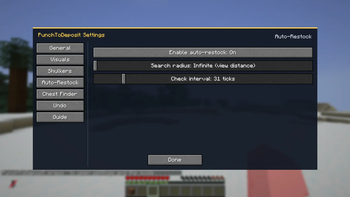
Features & Mechanics ### Visual HUD - Optional hotkey tips and transfer log - Optional hotbar highlights for matching items - Session totals for items deposited and withdrawn ### Custom Settings Menu Press the Settings & Guide key to open the in-game settings menu. - General, Visuals, Shulkers, Auto-Restock, Chest Finder, Undo, and Guide tabs - Numeric settings use sliders - Settings save immediately and persist across restarts - A search radius of `0` uses the server view-distance range ### Single deposit / withdraw Hold the item you want to move, hold the modifier key, then: - Left-click to deposit a matching stack - Right-click to withdraw a matching stack - Hold `Ctrl` while right-clicking to withdraw exactly one item ### Bulk mode Hold the bulk modifier too to move all matching items. Key Combinations The default mod modifier is `Left Alt`. All keybinds can be changed in Minecraft's Controls menu. ### Container transfers - **Alt + Left Click:** Deposit a matching stack. - **Alt + Right Click:** Withdraw a matching stack. - **Alt + Ctrl + Right Click:** Withdraw exactly one matching item. - **Alt + Shift + Left Click:** Bulk deposit all matching items. - **Alt + Shift + Right Click:** Bulk withdraw matching items. ### Holding a Shulker Box - **Alt + Left Click:** Deposit shulker contents that already match the target container. - **Alt + Right Click:** Pull matching container items into the shulker. - **Alt + Shift + Left Click:** Deposit all shulker contents. - **Alt + Shift + Right Click:** Fill the shulker from the container. ### Empty hand - **Alt + Left Click:** Deposit inventory items that already match the target container. - **Alt + Right Click:** Withdraw one available stack. - **Alt + Shift + Left Click:** Deposit the inventory into the container. - **Alt + Shift + Right Click:** Withdraw as much as possible. ### Utility - **Middle Mouse Button:** Lock or unlock an item slot, preventing automated transfers. This keybind is configurable. - **R:** Mark the selected hotbar slot for auto-restock. - **Ctrl + Z:** Undo the most recent supported transfer. - **G:** Toggle Chest Finder for the held item. - **O:** Open the Settings & Guide menu. Technical Details - Requires Fabric API on both client and server. - Transfers are handled server-side to keep inventories synchronized. - Prevents accidental block interaction while using transfer controls. - Supports Minecraft 26.1.x 26.2 (for now).请登录后举报
暂无评论,抢个沙发吧~