
Advanced TFC Blueprint
作者:rebot | 分类:模组
价格:0 墨喵币
下载量:0
点赞:0
版本 1.1.3
本资源为搬运资源,原资源地址:
https://modrinth.com/mod/advanced-tfc-blueprint
资源信息
Minecraft 版本: 1.7.10
平台: forge
标签: utility
资源介绍
Advanced Blueprint
The Advanced Blueprint aims to enhance the functionality of TFC blueprints. This mod is a reconstruction of the Advanced Blueprint. Since the original mod's files or code were unavailable, a similar mod was developed independently.
Item Usage
- Import Schematic: Use the new blueprint, hold
Shiftand right-click on a detailed block to import the block's schematic into the blueprint. You can also right-click in the air to edit the blueprint directly. - Apply Schematic: Once the blueprint stores a schematic, right-click on a detailed block to apply the blueprint's schematic. Similar to TFC blueprints, a hammer and chisel are required in the hotbar to apply the schematic.
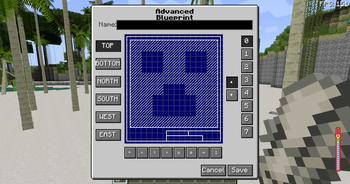
- Edit Schematic: Right-click in the air to open the Advanced Blueprint GUI for schematic editing.
GUI Usage
- GUI Title: The top section is the GUI title, which can be ignored.
- Blueprint Naming: Below the title, you can input any string as the blueprint's name. After saving, this name will be used as the item's name.
- Blueprint Controls:
- Left-click to toggle whether the current position is carved. The default state is uncarved, displayed as a slashed grid.
- Right-click to toggle the state of all blocks on the current layer and below.
- Left-click and drag to carve a continuous area.
- Operation Buttons:
- Below the blueprint controls, there are 8 buttons that allow you to perform the following operations on the carved schematic:
- Move left
- Move right
- Move up
- Move down
- Rotate 90° clockwise
- Rotate 90° counterclockwise
- Mirror left-right
- Mirror up-down
- Below the blueprint controls, there are 8 buttons that allow you to perform the following operations on the carved schematic:
- View Direction:
- On the left side of the blueprint controls, there are 6 buttons to select the viewing direction. The default is
TOP(viewing the blueprint from above).
- On the left side of the blueprint controls, there are 6 buttons to select the viewing direction. The default is
- View Layer:
- On the right side of the blueprint controls, buttons allow you to select the current viewing layer. The layer closest to you is
0, and the farthest is7.
- On the right side of the blueprint controls, buttons allow you to select the current viewing layer. The layer closest to you is
- Save and Cancel:
- The two buttons at the bottom right are used to either cancel the current changes or save the blueprint:
- Cancel: Reads data from NBT and overwrites the current changes.
- Save: Stores the current data into NBT.
- The two buttons at the bottom right are used to either cancel the current changes or save the blueprint:
Notes
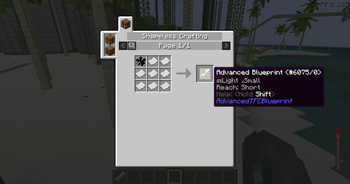
- The blueprint can be edited and used infinitely without being consumed, making its recipe relatively expensive.
- This mod is an addon of both terrafirmacraft and terrafirmacraftplus, download the correct version to play.
- This mod needs ModularUI and ModularUI2, developed by GTNH team.
Planned Features
- Save and load blueprints to and from files.
- Share blueprints with other players on the server.
- Add a block to upload and download blueprints to and from the server.
下载与版本
评论(0)
请 登录 后发表评论。
举报此资源
请登录后举报
赞助作者
请 登录 后赞助作者。
暂无评论,抢个沙发吧~