
Infinite Inventory
作者:rebot | 分类:模组
Minecraft 版本: 1.21.1
平台: neoforge
标签: equipment storage utility
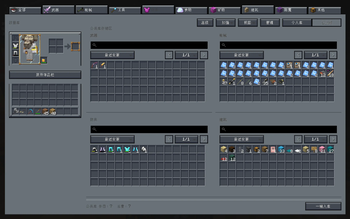
Infinite Inventory





Never run out of inventory space again.
Infinite Inventory is a NeoForge mod for Minecraft 1.21.1 that transforms the cramped player backpack into a personal, infinitely-expandable, database-style storage system. Instead of juggling chests, shulker boxes, and scattered storage rooms, you carry your entire item collection in a single searchable terminal — organized by tabs, filterable by bilingual search, and backed by automatic safety systems.
Why Download This Mod?
If you have ever:
- Run out of hotbar and inventory slots while mining or building
- Spent more time sorting chests than actually playing
- Lost track of which chest contains which item
- Wanted to find an item instantly without memorizing storage layouts
Then Infinite Inventory replaces all of that overhead with one full-screen database interface. Search by name, pinyin, item ID, tag, or mod — and extract exactly what you need in seconds.
Core Features
- Infinite Personal Storage — One database, zero slot limits. Store as many unique item stacks as you want.
- Full-Screen Database UI — Multi-panel views: personal storage, public storage (server-wide shared pool), or mixed mode.
- Bilingual Smart Search — Understands Chinese display names, English aliases, item IDs, namespaces, and pinyin (full spelling + initials).
- JEI-Style Advanced Search Syntax — Filter by mod (
@), item tag (#), registry name (&), creative tab (%), with AND/OR/NOT logic. - Tab Organization — Create, rename, reorder, and assign custom icons to tabs. Move entire tab contents in one action.
- Stable Sorting — Sort by recent changes, recently added, name, count, namespace, or item ID.
- Star & Note System — Mark frequently-used items as starred, or attach custom notes to any item.
- Operation Log Viewer — Review history of deposits, extractions, and other database actions.
- Auto-Store Enhancement — Automatically send picked-up items into a designated target tab.
- Data Safety — Rolling auto-backups every 15 minutes, manual backup/restore commands, and unresolved-item preservation when mods are temporarily missing.
- Optional Accessories / Curios Integration — Wear the database terminal as a back-slot accessory for quick access via a configurable hotkey.
Environment
| Aspect | Value |
|---|---|
| Side | Client and Server (required on both for full functionality; server-side handles data persistence and public storage) |
| Minecraft | 1.21.1 |
| Mod Loader | NeoForge |
| Supported NeoForge | 21.1.222+ |
| Java | 21 |
| Optional Dependencies | Accessories 1.1.0-beta.53+1.21.1, Curios 9.5.1+1.21.1 |
Installation
- Install Minecraft 1.21.1.
- Install a compatible NeoForge build in the 21.1.x range.
- Place the
Infinite InventoryJAR into yourmods/folder. - (Optional) Install Accessories or Curios if you want wearable terminal access from the back slot.
Note: The mod must be present on both client and server for multiplayer. The server handles data persistence and public storage; the client renders the UI and handles search input.
Crafting
Craft the Database Terminal in survival mode:

D E D
R C R
D G D| Symbol | Item |
|---|---|
| D | Diamond Block |
| E | Ender Pearl |
| R | Redstone Block |
| C | Chest |
| G | Gold Block |
Item ID: infiniteinventory:database_access_item
How to Use
Opening the Database
- Handheld: Right-click with the Database Terminal to open the full-screen interface.
- Equipped (Accessories / Curios): Bind a hotkey in Controls → Key Binds → "Infinite Inventory" → "Open Equipped Database" to open the UI instantly when the terminal is worn in the back slot.
Switching Views
Use the top toolbar to toggle between:
- Personal — your own private item database
- Public — server-wide shared storage (if enabled)
- Mixed — combined view of both
Depositing Items
- Left-click an item in your inventory to deposit 1
- Shift+click to deposit a full stack into a target tab
- Store All button — deposits your entire player inventory into the database
- Store Existing button — deposits only items that already have a matching entry in the database (useful for bulk restocking)
Deposit Conflict: If an item already exists in a different tab, a popup will let you choose whether to deposit to the original tab or move everything to the target tab.
Extracting Items
- Left-click a database entry to extract 1
- Shift+click to extract a full stack directly to your inventory
- Right-click for contextual options:
- Pick up a full stack to your cursor
- Pick up half a stack to your inventory
- Extract a custom amount (opens a number input overlay)
Searching
Type in the search bar to filter items. The search understands:
- Chinese item names and pinyin (full spelling + initials)
- English display names and aliases
- Exact item IDs and namespaces
Special search syntax:
| Prefix | Meaning | Example |
|---|---|---|
@ |
Filter by mod ID | @infiniteinventory |
# |
Filter by item tag | #minecraft:logs |
& |
Filter by registry name | &diamond |
% |
Filter by creative tab | %building blocks |
\| |
OR operator | diamond \| emerald |
- |
Exclude | -stone |
Spaces between terms act as AND.
Managing Tabs
- Create new tabs via the tab bar to categorize items
- Drag tabs to reorder them
- Right-click a tab to rename, change its icon, transfer its contents to another tab, or delete it
- Hide less-used tabs to keep the interface clean
- Batch transfer: Multi-select entries (click and drag or Shift+click), then right-click → "Move Selected to Another Category"
Stars & Notes
- Star frequently-used items for quick access
- Right-click → "Edit Note" to attach a custom note to any item
- Notes can be applied to a single item or to all selected items at once
Database Settings (Gear Icon)
The settings panel provides 5 navigation tabs:
- Adv. Search — Configure search behavior and default filters
- Boost — Toggle optional enhancements:
- Auto-store picked-up items — automatically deposit newly picked-up items into a designated target tab
- Show amount in tooltip — display the total stored count of an item in its tooltip
- Force save on critical mutation — immediately persist the database after important changes
- Views — Preview and switch between personal, public, and mixed views
- Manage — Create, delete, rename, reorder, and reorganize tabs in bulk
- Log — Review a chronological history of all deposits, extractions, transfers, and other database actions
Data Safety
Your data is stored in the overworld's SavedData system, not on the terminal item itself. This means:
- Terminal is replaceable — losing or breaking the terminal does not delete your database.
- Unresolved items preserved — if a mod is temporarily removed, its items are kept as unresolved entries and restored when the mod returns.
- Auto-backups — the database is backed up automatically every 15 minutes.
- Manual backup/restore — server operators can create snapshots and restore from them at any time.
Backup Commands
/infiniteinventory database backup now       # Create a manual backup
/infiniteinventory database backup list      # List available backups
/infiniteinventory database restore <name>   # Restore from a named backup
Reference Documentation
Links
- Source Code: https://github.com/A-G-guy/infinite-inventory
- Issue Tracker: https://github.com/A-G-guy/infinite-inventory/issues
- Modrinth: https://modrinth.com/mod/agguy-infinite-inventory
License
- Project license: Apache-2.0
- Third-party attributions: THIRD_PARTY_NOTICES.md
请登录后举报
请 登录 后赞助作者。
暂无评论,抢个沙发吧~