
Waystones
作者:rebot | 分类:模组
Minecraft 版本: 26.2
平台: paper purpur spigot
标签: game-mechanics transportation utility
?️ Waystones
Travel instantly across your worlds
A lightweight, 100% server-side teleportation plugin for Paper/Spigot and Purpur
Create named teleportation points anywhere on your server — Overworld, Nether, End — and let your players travel with a single click through a clear, intuitive menu. No client mod, no resource pack required.
Inspired by the well-known Waystones mod in the Minecraft community, this plugin reuses its core idea — named, reusable teleportation points — but as a server-side plugin only. Nothing to install on the client, no resource pack to distribute: everything runs directly on the server, through a simple in-game menu. A lightweight alternative for Paper/Spigot servers that can't or don't want to use client-side mods.
✨ Features
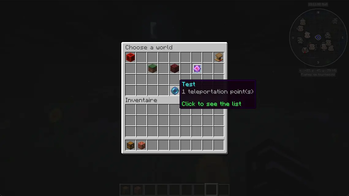
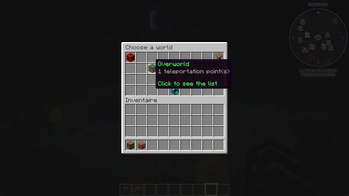
- ?️ Menu sorted by world — points are automatically grouped by dimension: Overworld, Nether, End (see gallery image #1)
- ?️ Renamable categories — customize the menu category names (e.g. "Nether" → "Underworld") to fit your server's theme
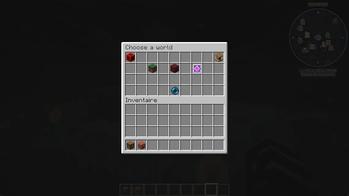
- ? Colored icons — green, red, or purple glass depending on the point's world of origin (see gallery image #4)
- ? Available in 30 languages — from the major European languages to Ukrainian, Georgian, Swahili, Japanese and Korean, changeable anytime via an admin command (see full list below)
- ⚡ Free, instant teleportation — with a configurable anti-spam cooldown
- ? Admin-only management — only OPs can create, rename, or remove a point
- ?️ Custom names — every point can be named and renamed at any time
- ?️ Customizable icons — pick the block/item shown for each waystone and each menu category (see gallery image #6)
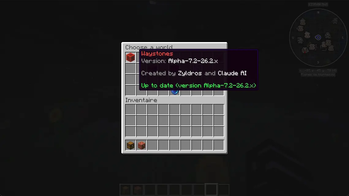
- ? Periodic update checks — the menu icon glows and tells you whether you're up to date or a new version is out (see gallery image #2)
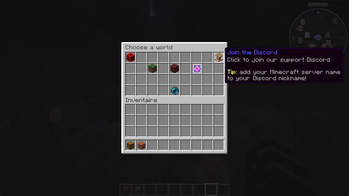
- ? Discord shortcut — a lectern icon in the main menu sends players a clickable link to the official support Discord (see gallery image #3)
- ? Reliable storage — persistent YAML storage, no data loss on restart
- ? Custom dimensions — link categories to worlds created by other plugins, see the dedicated section below (see gallery image #5)
? How it works
- An admin goes to the desired spot and types
/waystone create <name>→ the point is created instantly - A player types
/waystone→ the world selection menu opens - They pick a world → the list of points in that dimension is displayed
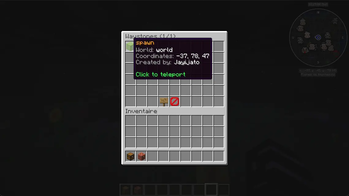
- Clicking a point → immediate, free teleportation
No complex configuration, no block to craft: everything happens through commands and the menu.
?️ Choosing a custom icon
Add @<material> at the end of the name when creating, or use /waystone seticon afterward:
/waystone create Village Spawn @DIAMOND_BLOCK
/waystone seticon Village Spawn @NETHER_BRICK
/waystone seticon Village Spawn @reset
The material must be an exact Bukkit API name (e.g. DIAMOND_BLOCK, NETHER_BRICK, EMERALD_ORE). An invalid material is rejected without changing anything.
? Adding a description
/waystone setdescription Village Spawn &7The starting point &e|&7Watch out for zombies at night
/waystone setcategorydescription nether &cDangerous zone
The | character separates lines, and & color codes work just like everywhere else in the plugin. reset (or no text) removes the description.
? Commands
Player commands — available to everyone with waystones.use
| Command | Description |
|---|---|
/waystone |
Opens the teleportation menu |
/waystone list |
Lists all existing points (can be disabled by an admin) |
/waystone tp <name> |
Direct teleportation via command (can be disabled by an admin) |
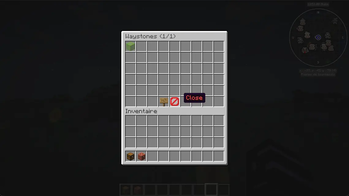
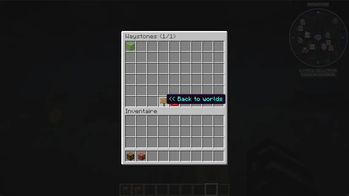
Once inside a category, navigation is simple: a back button returns you to the world menu (gallery image #7), and a close button lets you exit instantly (gallery image #8).
Admin commands — require waystones.admin
| Command | Description |
|---|---|
/waystone create <name> [@material] |
Creates a point at the player's position |
/waystone remove <name> |
Removes a point |
/waystone rename <old> <new> |
Renames a point |
/waystone setlang <code> |
Changes the plugin's language (30 languages) |
/waystone setcategoryname <overworld\|nether\|end> <name\|reset> |
Renames a menu category |
/waystone seticon <name> @<material\|reset> |
Changes a point's icon |
/waystone setcategoryicon <overworld\|nether\|end> <material\|reset> |
Changes a category's icon |
/waystone setdescription <name> <text\|reset> |
Adds a description to a point |
/waystone setcategorydescription <overworld\|nether\|end> <text\|reset> |
Adds a description to a category |
/waystone setcommand <list\|tp> <enabled\|disabled> |
Enables/disables the list or tp command |
/waystone createcategory <key> <world> |
Links a category to a custom dimension |
/waystone removecategory <key> |
Removes a custom dimension category |
/waystone setcategory <name> <key\|reset> |
Verifies/confirms a waystone's category |
/waystone setglint <enabled\|disabled> |
Toggles the custom dimension glow effect |
/waystone reload |
Reloads the configuration |
? Permissions
| Permission | Effect | Default |
|---|---|---|
waystones.use |
Use the menu and teleport | All players |
waystones.admin |
Create / rename / remove, reload config | OP only |
⚙️ Configuration
The config.yml file lets you customize:
language— plugin language (30 languages available, see dedicated section below), changeable in-game via/waystone setlangteleport-cooldown-seconds— anti-spam delay between two teleportseffects-enabled— enable/disable sound and particle effectsupdate-checker-enabled— enable/disable update checkingupdate-check-interval-hours— interval between automatic checks (12h by default)
Player-facing text is not editable: it's built into the plugin, in all 4 supported languages, to guarantee reliable and consistent behavior. Category names, however, are customizable via the /waystone setcategoryname command.
? Supported languages
30 languages, laid out two per row to keep this compact.
| Language | Code | Language | Code |
|---|---|---|---|
| ?? French | fr |
?? Ukrainian | uk |
| ???? English | en |
?? Belarusian | be |
| ?? Portuguese (Brazil) | pt-br |
?? Estonian | et |
| ?? Portuguese (Portugal) | pt-pt |
?? Latvian | lv |
| ?? French (Québec) | fr-ca |
?? Lithuanian | lt |
| ?? Spanish | es |
?? Serbian (Latin) | sr-latn |
| ?? Norwegian (Bokmål) | nb |
?? Bulgarian | bg |
| ?? Swedish | sv |
?? Georgian | ka |
| ?? Finnish | fi |
???? Swahili | sw |
| ?? Italian | it |
?? Indonesian | id |
| ?? Dutch | nl |
?? Japanese | ja |
| ?? German | de |
?? Korean | ko |
| ?? Icelandic | is |
||
| ?? Hungarian | hu |
||
| ?? Romanian | ro |
||
| ?? Czech | cs |
||
| ?? Slovak | sk |
||
| ?? Polish | pl |
The language is set globally by the server admin (no automatic per-player detection), with an automatic fallback to English if a text is missing. It can be changed at any time, without a restart, via /waystone setlang <code>.
? Compatibility
| Plugin version | Minecraft lines covered |
|---|---|
| v7.3 (current, latest features) | 26.2.x |
| v5.2 | 1.12.2 · 1.13.x · 1.14.x · 1.15.x · 1.16.x · 1.17.x · 1.18.x · 1.19.x · 1.20.x · 1.21.x · 26.1.x |
✅ Complete compatibility roadmap — Waystones covers every officially supported Minecraft version, from 1.12.2 up to the current version. New features (v6.0 through v7.3, breakdown below) are available on the 26.2.x line; earlier versions intentionally remain on the v5.2 feature set, with no backport planned. The exact jar for each line is listed in the Installation section below.
? Which feature is in which version?
Every version listed below only applies to the 26.2.x jar (the only one receiving new features). The other 11 jars (1.12.x → 26.1.x) all stay on the v5.2 feature set, which already includes: per-world menu, free teleportation, configurable cooldown, custom names, YAML storage, a basic update checker, and 4 languages (fr/en/pt-br/fr-ca).
| Version | Minecraft version(s) | Feature added |
|---|---|---|
| v5.2 | 1.12.2 → 26.1.x (11 lines) | Common baseline for every Minecraft line (see above) |
| v6.0 | 26.2.x only | Renamable menu categories (setcategoryname) · improved update checker (periodic checks, green "up to date"/red "update available" line) |
| v6.1 | 26.2.x only | Customizable icons for points and categories (@material, seticon, setcategoryicon) |
| v6.2 | 26.2.x only | 8 additional languages (es, pt-pt, nb, sv, fi, it, nl, de), 12 languages total |
| v6.3 | 26.2.x only | Customizable descriptions for points and categories (setdescription, setcategorydescription), multi-line via \| |
| v6.4 | 26.2.x only | 18 more languages (30 total) |
| v6.5 | 26.2.x only | Togglable list and tp commands (setcommand) |
| v6.6 | 26.2.x only | Discord shortcut — a lectern icon in the main menu links to the official support server |
| v6.7 | 26.2.x only | The info icon now glows when an update is available |
| v7.0 | 26.2.x only | Custom dimensions support — createcategory, removecategory, setcategory, setglint (see dedicated section above) |
| v7.1 | 26.2.x only | 14 anonymous bStats charts tracking feature usage (privacy-safe, aggregate only) · one-time admin notice about the importance of bStats statistics, shown after updates |
| v7.2 | 26.2.x only | Translation completeness fix — 12 languages were missing menu and command text, now fully synced across all 30 |
| v7.3 | 26.2.x only | Custom dimensions support graduates from Alpha to stable · FastStats added alongside bStats for richer analytics and error tracking |
In short: if you're on the 26.2.x line, you get everything listed above (v7.3 includes everything before it). If you're on an earlier line (1.12.x → 26.1.x), you're limited to the v5.2 baseline.
?️ Understanding version numbers
Every plugin file follows a simple format: Waystone-<plugin version>-<Minecraft version>.jar, with an optional Alpha/Beta/Release prefix marking its stability status. For example, Waystone-Release-7.3-26.2.x.jar means: plugin version 7.3, Release (stable) status, compatible with the current Minecraft 26.2.x version. The same plugin is also available as Waystone-5.2-1.12.x.jar for the 1.12.x line — different version numbers, since 1.12.x hasn't received the v6.x/v7.x features yet.
Two important things to know:
- The plugin version and the Minecraft version evolve independently. Porting Waystones to a new Minecraft version without any feature change doesn't change the plugin's version number — only the Minecraft suffix changes.
- The plugin version number follows a major.minor logic (e.g. 5.0 → 5.1):
- A minor change (5.0 → 5.1) is a small adjustment or addition to an existing feature.
- A major change (5.1 → 6.0) is a significant new feature or a major rework of the plugin.
? Custom dimensions — "The Emergence of Custom Dimensions"
Link Waystones categories to dimensions created by third-party plugins (DimensionControl, Multiverse-Core, or anything that adds a world) — declared explicitly by the admin, never guessed automatically.
/waystone createcategory royaume myrealm_world
/waystone create Entrance to the Realm #royaume- A category only appears in the menu once it actually contains a waystone
- The server's own primary Overworld/Nether/End can never be hijacked into a custom category
- Custom categories glow subtly in the menu (togglable via
/waystone setglint), and never lose their data if the linked world later disappears — they just turn grey and become admin-only until it's back (see gallery image #5 for the glow effect)
See the full command list below for createcategory, removecategory, setcategory, and setglint.
? Statistics
Waystones uses bStats to collect anonymous usage statistics (server count, versions, language used...). No personal data is collected. Publicly viewable, and can be disabled at any time server-side via plugins/bStats/config.yml.
Alongside bStats, Waystones also uses FastStats for anonymous error tracking, helping catch bugs before they turn into support tickets. Like bStats, it's opt-out server-side via plugins/faststats/config.properties (enabled=false).
? Installation
- Download the jar matching your Minecraft version:
Waystone-5.2-1.12.x.jarfor 1.12.2Waystone-5.2-1.13.x.jarfor the 1.13.x lineWaystone-5.2-1.14.x.jarfor the 1.14.x lineWaystone-5.2-1.15.x.jarfor the 1.15.x lineWaystone-5.2-1.16.x.jarfor the 1.16.x lineWaystone-5.2-1.17.x.jarfor the 1.17.x lineWaystone-5.2-1.18.x.jarfor the 1.18.x lineWaystone-5.2-1.19.x.jarfor the 1.19.x lineWaystone-5.2-1.20.x.jarfor the 1.20.x lineWaystone-5.2-1.21.x.jarfor the 1.21.x lineWaystone-5.2-26.1.x.jarfor the 26.1.x lineWaystone-Release-7.3-26.2.x.jarfor 26.2.x (current version, latest features — including stable custom dimensions support)
- Drop it into your server's
plugins/folder - Restart the server
- Grant the
waystones.adminpermission to your team to start placing points
? Found a bug or have a suggestion? Leave a comment or open a support ticket — all feedback is welcome.
请登录后举报
暂无评论,抢个沙发吧~