
BedrockHeightGuard
作者:rebot | 分类:模组
Minecraft 版本: 1.21 1.21.1 1.21.2 1.21.3 1.21.4 1.21.5 1.21.6 1.21.7 1.21.8 1.21.9 1.21.10 1.21.11
平台: folia paper purpur
标签: game-mechanics management utility
BedrockHeightGuard
Stop Bedrock Players From Going Where They Can't Render
Here's the problem every Geyser server admin hits eventually:
A Bedrock player flies up to Y=400. On their screen, chunks stop loading.
Blocks disappear. They fall through the world. They open tickets. They
complain in chat. They think your server is broken.
It's not your server. Bedrock Edition hard-caps chunk rendering at Y=320
(extended to 519 with certain settings, but most clients don't support it
properly). If your server has builds above that line — and on BuildTheEarth
servers, builds regularly go above 320 — Bedrock players physically cannot
exist up there without things breaking.
BedrockHeightGuard solves this at the server level. No client mods. No
resource packs. No weird workarounds. The plugin detects Bedrock-connected
players through Floodgate and clamps their movement, building, and breaking
to a Y range you configure. Java players are never touched. Operators are
never touched. It just quietly fixes the one thing Geyser can't handle on
its own.
How It Works (Technical Overview)
The plugin hooks into Floodgate's API at runtime using reflection. This means
it detects Bedrock players without a hard compile-time dependency on
Floodgate — if Floodgate isn't installed, the plugin disables gracefully
instead of crashing your server.
When a Bedrock player moves, teleports, places a block, or breaks a block,
the plugin checks their Y coordinate against the configured range for their
current world. If they're outside the range:
-
Movement: Their position is clamped back to the nearest valid Y.
The correction is sent client-side so they don't rubber-band visibly.
Head rotation changes are filtered out — if a player just looks around
without actually moving, the event is skipped. This saves a lot of CPU
on busy servers. -
Block placement/breaking: The action is cancelled immediately. The
player gets a message telling them why. -
Teleportation: Caught by the same handler as movement. If someone
(or another plugin) teleports a Bedrock player above the limit, they
get clamped. -
Join: If a player logs in at an invalid Y (left over from a previous
session, another plugin, whatever), they're corrected before they fully
load in.
All of this is skipped for:
- Java Edition players (Geyser passes them through but the plugin ignores them)
- Players with the bypass permission
- Players in game modes you've excluded from enforcement (creative-only
enforcement, survival-only enforcement — your choice)
Features
Height Limits
- Per-world maximum and minimum Y boundaries
- Global fallback values for worlds that don't have specific overrides
- Example: overworld capped at 319, nether at 255, end at 255 — each world
gets its own rule
Movement Enforcement
- PlayerMoveEvent and PlayerTeleportEvent interception
- Head-rotation optimization — looking around doesn't trigger the check,
only actual position changes - Smooth position correction (no visible rubber-banding for the player)
- Optional teleport-on-violation: instead of clamping to the nearest safe
Y, send the player to a fixed safe coordinate you define in config
Build Protection
- Block place cancellation above/below the configured range
- Block break cancellation above/below the configured range
- Works with all block types including piston events and falling blocks
Player Communication
- Proximity warning: when a player approaches the limit (configurable
distance), they get a heads-up before they hit the hard cap - Message delivery via chat OR action bar — your choice
- First-join title: first time a player hits the limit in a session,
they see a title notification. After that, just the regular message. - All messages are fully customizable in the config (color codes supported)
Staff Tools
- Staff notification system: when a player violates the height limit,
online staff with the notify permission get a message with the player
name, world, and Y coordinate - Full admin command set with tab completion:
/bteheightguard reload — live config reload without server restart
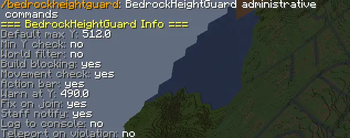
/bteheightguard info — current config summary
/bteheightguard check — check a specific player's Y
/bteheightguard stats — server-wide violation statistics
/bteheightguard togglewarnings — enable/disable proximity warnings - Console logging: every violation is logged with timestamp, player UUID,
world, and Y coordinate. Searchable in your server logs.
Statistics & Tracking
- Per-player stats tracked in memory during runtime
- Persisted to disk across server restarts
- Tracks: total limit hits, blocked build actions, highest Y coordinate
ever reached - Useful for identifying repeat offenders or debugging edge cases
Game Mode Filtering
- Enforce limits only in specific game modes
- Example: only enforce in survival and adventure, let creative players
fly freely (or the opposite — your server, your rules)
Configuration
The config.yml is fully documented with inline comments. Here's the
structure at a glance:
# Global fallback limits
limits:
  max-y: 320
  min-y: -64

# Per-world overrides
worlds:
  world:
    max-y: 319
    min-y: -64
  world_nether:
    max-y: 255
    min-y: 0

# Behavior
enforcement:
  teleport-on-violation: false
  safe-teleport-y: 300
  game-modes:
    - SURVIVAL
    - ADVENTURE

# Messages
messages:
  delivery: ACTION_BAR  # CHAT or ACTION_BAR
  proximity-warning-distance: 10
  first-violation-title: true

# Staff
staff:
  notify-enabled: true

# Logging
logging:
  console: true
  stats-persistence: true
Everything can be reloaded live with /bteheightguard reload. No server
restart needed.
Permissions
| Permission Node | Default | What It Does |
|---|---|---|
| bteheightfix.admin | op | Access to all /bteheightguard subcommands |
| bteheightfix.reload | op | Allows /bteheightguard reload specifically |
| bteheightfix.bypass | op | Player is completely exempt from height enforcement |
| bteheightfix.notify | op | Receives staff alerts when other players violate the limit |
Grant bteheightfix.bypass to trusted Bedrock players who you know have
clients that support extended heights. Or don't — your call.
Installation
- Download the .jar file from this page
- Drop it into your server's /plugins/ folder
- Restart the server (first boot generates config.yml)
- Edit config.yml to set your world-specific height limits
- Run /bteheightguard reload to apply without restarting
That's it. No Floodgate addon. No Geyser extension. No database setup.
It just works.
Requirements
- Server software: Paper 1.21.x or compatible fork (Purpur works)
- Geyser: Required — this is a Geyser/Floodgate environment plugin
- Floodgate 2.x: Required — used for Bedrock player detection
- Java: 17 or higher
Tested on Paper and Purpur. Folia is not officially supported — the plugin
uses standard Bukkit scheduling which may behave unexpectedly under
regionized threading. If you're on Folia, test thoroughly before deploying
to production.
FAQ
Why not just fix this in Geyser itself?
Geyser's job is translation, not gameplay enforcement. Bedrock chunk
rendering limits are a client-side constraint that Geyser can't change.
The height where chunks stop loading is baked into the Bedrock client.
This plugin handles the server side of that problem — keeping players
in the range where their client actually works.
Does this affect Java players at all?
No. The plugin checks if the player is Bedrock-connected through Floodgate
before doing anything. Java players pass through completely untouched. Zero
overhead for them.
What happens if Floodgate isn't installed?
The plugin loads but does nothing. It disables its event listeners and
logs a warning. It won't crash your server or spam errors.
Can I set different limits per world?
Yes. The config supports per-world overrides with a global fallback. Set
a default max-y of 320 and then override specific worlds (like the nether
at 255 or a custom world at 512).
Does position clamping cause rubber-banding?
No. The correction packet is sent in a way that the client interprets as
a normal position update. The player gets smoothly moved back. We tested
this extensively — if you see rubber-banding, check for conflicting
movement plugins.
Does this work with PlotSquared / WorldEdit / FAWE?
Yes. Block events are cancelled at the Bukkit event level, which happens
before any building plugin processes them. Movement clamping operates
independently of other teleport handlers. No known conflicts.
I have a build above Y=320 that Bedrock players need to visit. What do I do?
Either grant them bteheightfix.bypass permission (if their client supports
extended heights) or raise the max-y for that specific world in config.
The plugin is flexible — set the limits that make sense for YOUR server.
Why the name "BTE Height Fix" in the permission nodes?
This plugin was originally built to fix a specific problem on BuildTheEarth
servers. The name stuck. It works for any cross-play server with extended
build heights, not just BTE.
Can Bedrock players see builds above their render limit?
No, and that's the whole point. Bedrock clients physically cannot render
chunks above Y=320 (in most cases). Rather than letting players fly into
an invisible void and file bug reports, this plugin keeps them in the
range where everything works. You can always use /bteheightguard check
to see where a player is relative to the limit.
Why This Plugin Exists
I run a cross-play server that's part of a large build project. We had
Bedrock players constantly flying above 320, losing chunks, falling through
the world, and reporting it as a server bug. We tried world borders. We
tried spawn regions. We tried telling people in chat. Nothing worked
consistently because the problem isn't a permissions issue or a player
education issue — it's a client rendering limitation that the server
doesn't enforce by default.
So I wrote this. It intercepts the events, clamps the positions, and
sends a clear message to the player. Problem gone. No tickets. No
complaints. Bedrock players stay in the world they can actually see.
If you run a Geyser server with builds above 320, you probably need this.
Support
Found a bug? Open an issue on Discord with:
- Your server version (paper --version output)
- Your Geyser and Floodgate versions
- A description of what happened
- Relevant console logs if available
Feature requests welcome. Pull requests even more welcome.
If this plugin saved you from Bedrock support tickets, leaving a review
here helps other server admins find it.
请登录后举报
请 登录 后赞助作者。
暂无评论,抢个沙发吧~