
Good Asset Fetcher
作者:rebot | 分类:模组
Minecraft 版本: b1.7.3
平台: babric fabric
标签: library

Good Asset Fetcher



Library mod for StationAPI that provides an interface for other mods to fetch resources from official Mojang jars on the
fly when starting the game; this allows mods to utilise the game's assets without incurring license violations.
Currently only supports clientside assets (not datapacks).
Requirements
- Minecraft Beta 1.7.3
- Babric
- StationAPI
- Fabric Language Kotlin
Usage (for developers)
-
Import
pw.tmpim.mygoodmods:good-asset-fetcherfrom Maven (see the version badge above for the latest version):repositories { maven("https://repo.lem.sh/releases") { name = "Lemmmy Repo" content { includeGroupAndSubgroups("sh.lem") includeGroupAndSubgroups("pw.tmpim") } } } dependencies { modImplementation("pw.tmpim.mygoodmods:good-asset-fetcher:1.0.4") } -
Register a client-only endpoint for your mod in
fabric.mod.jsonif you don't already have one:{ "entrypoints": { "stationapi:event_bus_client": "com.example.yourmod.ExampleModClientListener" }, "depends": { "good-asset-fetcher": "1.x" } } -
Listen to the
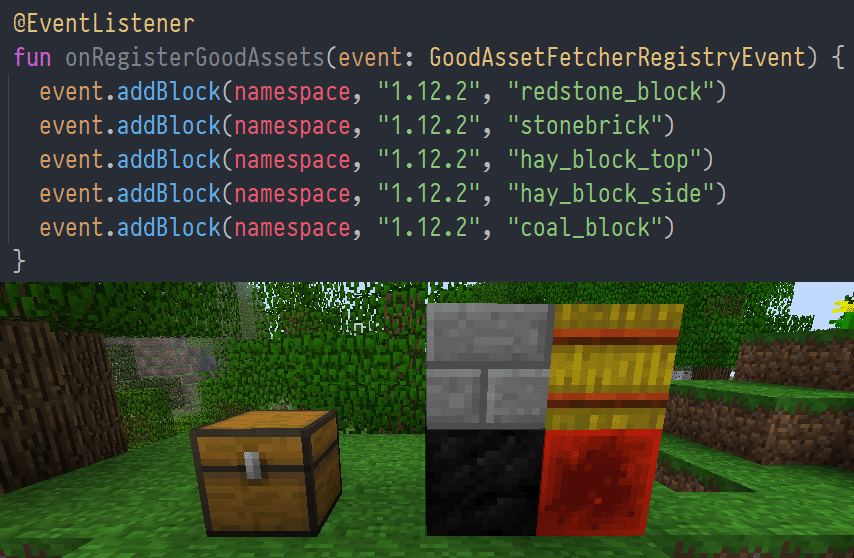
GoodAssetFetcherRegistryEventand calladdResourceFile,addBlock, oraddItem:public class ExampleEventListener { @Entrypoint.Namespace public static Namespace NAMESPACE; @EventListener public void onRegisterGoodAssets(GoodAssetFetcherRegistryEvent event) { // shorthands for blocks and items: event.addBlock(NAMESPACE, "1.12.2", "redstone_block"); event.addItem(NAMESPACE, "1.12.2", "stick"); // load an asset by full path: event.addResourceFile(NAMESPACE, "1.12.2", "assets/minecraft/textures/blocks/stone.png"); } } -
Use the textures under
assets/your-mod/stationapi/textures/block/stone.png:{ "parent": "minecraft:block/cube_all", "textures": { "all": "your-mod:block/stone" } }
How it works
During the game's init phase, before resource packs are loaded, Good Asset Fetcher loads the version manifest from the
Minecraft Launcher to get a listing of all game versions. This listing is then cached indefinitely at
.minecraft/mods/good-asset-fetcher/asset-cache/versionManifest-$modVersion.json.
Then, GoodAssetFetcherRegistryEvent is called to fetch the resource definitions for every mod. Mods may request to
fetch assets from (almost?) any version of the game.
When resource packs are loaded, the mod injects its own dynamic resource pack at runtime. When this is first loaded
during a session, it checks for any missing assets in the mod's cache directory,
.minecraft/mods/good-asset-fetcher/asset-cache.
Armed with the knowledge of all the missing assets and their associated game versions, good-asset-fetcher will
download each version's manifest and jar in-memory, validate the hash, and extract the required files. This process is
done during resource pack load, so it will block the game the first time it happens, and then ideally remain cached
permanently in .minecraft/mods/good-asset-fetcher/asset-cache.
Since StationAPI stores assets in a slightly different location to most versions of vanilla, the mod performs the
following path conversions to the destination file path automatically:
| Source path | Cached path |
|---|---|
assets/minecraft/textures/blocks |
assets/${namespace}/stationapi/textures/block |
assets/minecraft/textures/items |
assets/${namespace}/stationapi/textures/item |
If your use case is not properly covered, the
addResourceFile(Namespace namespace, String gameVersion, String sourcePath, String destPath) overload is available for
you to specify your own destination path. Note, however, that it will still go through the same string replacements as
above.
License
This mod is licensed under the MIT license.
请登录后举报
暂无评论,抢个沙发吧~