
Hearthglow Cottagecore cosy shader
作者:rebot | 分类:光影包
Minecraft 版本: 1.17 1.17.1 1.18 1.18.1 1.18.2 1.19 1.19.1 1.19.2 1.19.3 1.19.4 1.20 1.20.1 1.20.2 1.20.3 1.20.4 1.20.5 1.20.6 1.21 1.21.1 1.21.2 1.21.3 1.21.4 1.21.5 1.21.6 1.21.7 1.21.8 1.21.9 1.21.10
平台: iris optifine
标签: atmosphere bloom vanilla-like
Hearthglow
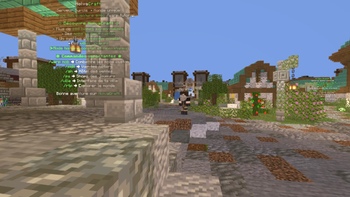
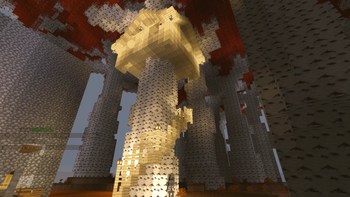
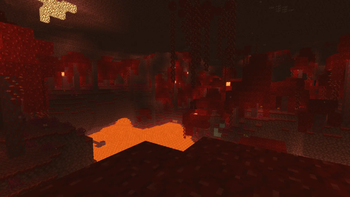
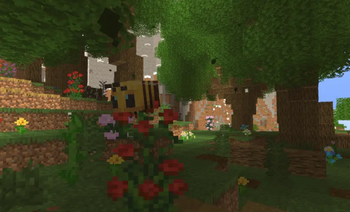
Hearthglow is a cozy, cottagecore-style shader pack for Minecraft. Instead of chasing photorealism like most modern shaders, it's built around one specific goal: making your world feel warm, soft, and inviting — like a sunny afternoon in a storybook cottage rather than a cinematic realism showcase.
Almost every popular shader pack on the market (BSL, Complementary, SEUS, Sildur's) is built around the same set of goals: accurate shadows, realistic water, path tracing, PBR materials. That's great if you want your world to look like a AAA game, but it doesn't suit every build style. Hearthglow takes the opposite approach: it deliberately softens the image, warms up the lighting, and smooths out contrast to match the aesthetic that cottagecore builders, cozy-gaming streamers, and farm/village screenshots are actually going for.
Features
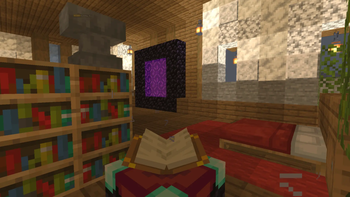
Warm, lifted ambient lighting — Shadowed areas and interiors are brightened and given a warm tint, so your builds never look dim or gray. Torches, fireplaces, and windows read as genuinely cozy light sources instead of harsh point lights.
Soft glow (bloom) — Light sources such as windows, campfires, and direct sunlight get a gentle halo around them, giving scenes a warm, hazy quality without blowing out the image.
Dreamy softness — A very light blur blend is applied to reduce harshness and give the world a slightly storybook, hand-painted feel, without making the game look actually blurry or hard to play.
Pastel color grading — Contrast is gently reduced and colors are pulled toward a softer, pastel palette instead of Minecraft's default punchy saturation.
Warm vignette — A soft, warm-toned darkening at the edges of the screen adds atmosphere without distracting from gameplay.
Fully configurable in-game — Every effect (warmth, glow strength, pastel amount, vignette strength, softness) has its own slider in the in-game Shader Options menu, so you can tune the intensity to your taste instead of being locked into one fixed look.
Lightweight — No shadow maps, no path tracing, no heavy reflections. Hearthglow is a post-processing and lighting shader, so it runs comfortably even on modest hardware.
Who it's for
Cottagecore and cozy-aesthetic builders, farm/village/cabin-style worlds, cozy let's-play and streaming content, and anyone who wants their screenshots and videos to feel warm and inviting rather than dark or hyper-realistic.
Compatibility
Requires Iris or OptiFine
Works on any Minecraft version supported by your chosen loader (Iris 1.16.5+, or whichever version your OptiFine build supports)
Installation
Install Iris (Fabric) or OptiFine.
Download Hearthglow.zip and place it — without extracting — in your .minecraft/shaderpacks folder.
In Minecraft, go to Options > Video Settings > Shaders, and select Hearthglow.
Click Shader Options to fine-tune warmth, glow, pastel amount, vignette, and softness to your liking.
请登录后举报
请 登录 后赞助作者。
暂无评论,抢个沙发吧~