
Yiv's Preset
作者:rebot | 分类:模组
Minecraft 版本: 1.21.11
平台: fabric
标签: optimization utility



Yiv’s Presets




Client-only presets you can cycle with one key. Tune render/FPS options for Build, Explore, and Combat, then swap instantly in-game with a small top-center HUD toast.
- Default keybind:
F9(Cycle Preset) - Presets out of the box: Build → Explore → Combat
- Environment: Client only
✨ Features
- One-key preset cycling with a minimal toast (top-center, 4.5s)
- Per-world/server persistence via JSON config
- Advanced Preset Editor (CRUD, set default)
- Options per preset include:
- Render Distance (chunks)
- Simulation Distance (chunks) [clamped to vanilla-safe min 5]
- Graphics: Fast / Fancy / Fabulous
- Particles: Minimal / Decreased / All
- Clouds: Off / Fast / Fancy
- Smooth Lighting (Ambient Occlusion) On/Off
- Entity Shadows On/Off
- Entity Distance Scaling
- Mipmap Levels
- Biome Blend Radius
- View Bobbing On/Off
- Distortion Effects Scale
- Max FPS (Unlimited at 260)
- VSync On/Off (applied on title screen for stability)

? Requirements
✅ Required
- Fabric Loader:
>= 0.17.2 - Minecraft:
1.21.x(declared as~1.21) - Java:
>= 21 - Fabric API: any 1.21-compatible version
⚙️ Optional
- Mod Menu: Adds a “Settings” button that opens the mod’s settings screen (your mod runs fine without it).
? Notes:
- Cloth Config isn’t required; the Advanced Editor is built-in.
- The mod is client-only; no server installation needed.
? Screenshots
1) Settings screen (entry)
- Access the Advanced Editor
- Reset to default presets (with confirmation dialog)

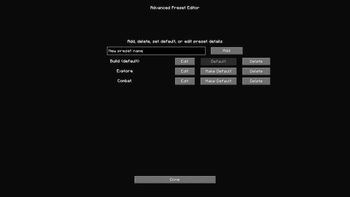
2) Advanced Editor hub
- Add, Delete, Edit, and Make Default for your presets.
- The current default preset is labeled.

3) Preset Editor (edit a profile)
- Fields for every supported option (Render/Simulation Distance, Graphics, Particles, Clouds, Smooth Lighting, Entity Shadows, Entity Distance Scaling, Mipmap Levels, Biome Blend, View Bobbing, Distortion, Max FPS, and VSync).
- Save/Cancel buttons at the bottom.

? Usage
- Press
F9in-game to cycle: Build → Explore → Combat. - A toast shows which preset was applied.
- Open the settings (via Mod Menu) to tweak or add new presets.
⚖️ Stability
- Simulation Distance is clamped to a safe minimum (5) to avoid vanilla errors.
- VSync and Fabulous graphics can cause GPU pipeline resets; to stay stable, VSync changes and Fabulous mode are applied on the title screen.
- In-world, Fabulous is mapped to Fancy for safety.
- Mipmap changes don’t force a mid-frame resource reload (avoids crashes). If needed, manually reload via Minecraft’s resource pack reload.
? License
This project is licensed under the MIT License.
请登录后举报
暂无评论,抢个沙发吧~