
Discord Bridge
作者:rebot | 分类:模组
Minecraft 版本: 1.21 1.21.1 1.21.2 1.21.3 1.21.4 1.21.5 1.21.6 1.21.7 1.21.8 1.21.9 1.21.10 1.21.11
平台: bukkit paper purpur spigot
标签: game-mechanics management utility
DiscordBridge
A lightweight Minecraft server plugin that seamlessly connects your server chat with Discord using webhooks.



Features
- Real-time Chat Sync: All player messages are instantly sent to your Discord channel
- Player Activity Notifications: Get notified when players join or leave the server
- Death Messages: Player death events are broadcasted to Discord with full details
- Player Avatars: Automatic player head integration using Minotar
- Console Messages: Server events appear with a custom console avatar
- Easy Configuration: Simple YAML config file setup
- Reload Command: Update settings without restarting your server
- Minecraft Prefix: All messages are tagged with
[minecraft]for easy identification
Quick Setup
- Install the plugin in your
pluginsfolder - Start your server to generate the config file
- Edit
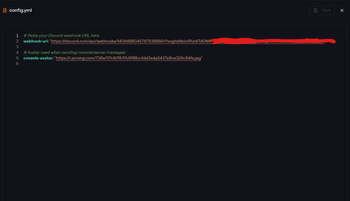
/plugins/DiscordBridge/config.yml:webhook-url: "https://discord.com/api/webhooks/YOUR_WEBHOOK_URL" console-avatar: "https://your-console-avatar-url.png" - Use
/dbridge reloadto apply changes
Commands
/dbridge reload- Reload the plugin configuration
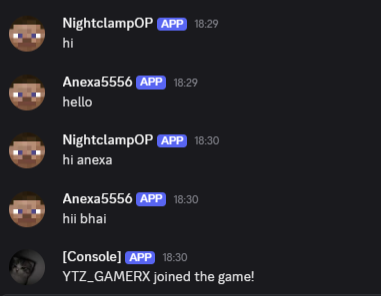
What Gets Sent to Discord
- Player Chat:
[minecraft] PlayerName: Hello world! - Player Joins:
[minecraft] [Console]: PlayerName joined the game! - Player Leaves:
[minecraft] [Console]: PlayerName left the game! - Player Deaths:
[minecraft] [Console]: PlayerName was slain by Zombie
Creating a Discord Webhook
- Go to your Discord server settings
- Navigate to Integrations → Webhooks
- Click "New Webhook"
- Choose your channel and copy the webhook URL
- Paste it into your config.yml
Requirements
- Minecraft Server: 1.20+ (Bukkit/Spigot/Paper)
- Java: 17 or higher
- Discord Webhook: Required for functionality
Configuration
# Discord webhook URL (required)
webhook-url: "https://discord.com/api/webhooks/YOUR_WEBHOOK_HERE"
# Avatar URL for console messages (optional)
console-avatar: "https://example.com/console-icon.png"
Perfect For
- Community Servers: Keep Discord members connected to in-game chat
- Staff Monitoring: Track player activity from Discord
- Death Tracking: Monitor player deaths and dangerous areas
- Cross-Platform Communication: Bridge the gap between Minecraft and Discord
- Server Administration: Monitor your server without being in-game
Pro Tips
- Use a dedicated Discord channel for server chat to avoid spam
- Set up proper webhook permissions in your Discord server
- Consider using a custom console avatar that matches your server theme
- The plugin automatically handles message escaping and special characters
- Want to see it in action? Join the Broken SMP - one of the best Minecraft servers using this plugin!
Privacy & Security
- No data is stored or logged by this plugin
- Only sends public chat messages and join/leave events
- Uses Discord's official webhook API
- All communication is encrypted via HTTPS
? Support & Community
Having issues? Check that your webhook URL is correct and that the Discord channel permissions allow webhook messages.
? Connect with the Developer
- GitHub: github.com/SaarasnhDx - Source code, issues, and contributions
- YouTube: youtube.com/@saaransh_Xd - Tutorials and Minecraft content
- Discord: Join Broken SMP - Experience the plugin in action on the best Minecraft server!
Made with ❤️ for the Minecraft community by SaarasnhDx
请登录后举报
请 登录 后赞助作者。
暂无评论,抢个沙发吧~