
MCRestAPI
作者:rebot | 分类:模组
Minecraft 版本: 26.1 26.1.1 26.1.2
平台: fabric
标签: management technology utility

MCRestAPI
A Fabric mod that exposes a REST API and real-time event stream (SSE) for monitoring and controlling dedicated Minecraft servers. Built on top of the JDK's built-in HTTP server with zero external dependencies. Available for Minecraft 1.21.11 and 26.1+ — download the file that matches your version.
Features
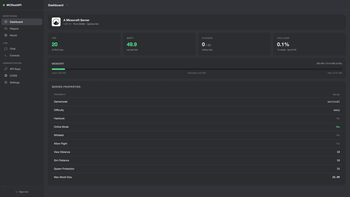
- REST API for server monitoring (TPS, MSPT, memory, CPU, player count, server properties)
- Real-time Server-Sent Events (SSE) stream for chat, joins, leaves, deaths and game messages
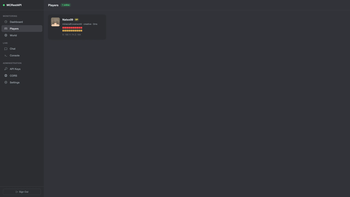
- Complete player data: health, food, position, dimension, ping, gamemode, OP status, skin head URL
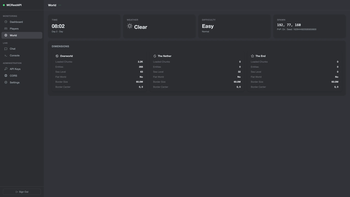
- World data: seed, time, weather, difficulty, entity count, loaded chunks, per-dimension stats
- Remote command execution via API
- Built-in admin dashboard (single-page web app) for monitoring and management
- Bundled Swagger UI with OpenAPI 3.1.0 specification
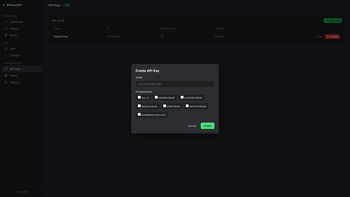
- Multi-key authentication with granular permissions
- Master key for administrative operations
- CORS configuration with per-origin allowlist
- API keys hashed with PBKDF2-SHA256 (never stored in plain text)
- Zero external dependencies (uses JDK built-in HTTP server)
- Virtual threads for lightweight concurrency
- Server-side only (does not run on clients)
Requirements
| Component | 1.21.11 line | 26.1 line |
|---|---|---|
| Minecraft | 1.21.11 | 26.1.x |
| Java | >= 21 | >= 25 |
| Fabric Loader | >= 0.18.4 | >= 0.19.3 |
| Fabric API | any | any |
Each release on Modrinth is tagged with its supported Minecraft version — install the one matching your server.
Installation
- Download the latest
mcrestapi-x.x.x.jarfrom this page or from GitHub Releases - Place the JAR file in the
mods/folder of your Fabric server - Start the server
- On first launch, the mod generates a config file at
config/mcrestapi.jsonand prints the master key and default API key to the server console. Save both keys immediately -- they cannot be retrieved later. - The API is available at
http://localhost:8080by default - The admin dashboard is at
http://localhost:8080/admin
Configuration
The configuration file is located at config/mcrestapi.json and is generated automatically on first launch.
| Field | Type | Default | Description |
|---|---|---|---|
port |
integer | 8080 |
Port the HTTP server listens on |
bindAddress |
string | 127.0.0.1 |
Address to bind to. Use 0.0.0.0 for all interfaces |
maxConnections |
integer | 50 |
Maximum concurrent HTTP connections |
swagger |
boolean | true |
Enable/disable Swagger UI and OpenAPI spec |
masterKeyHash |
string | (generated) | PBKDF2 hash of the master key |
auth |
object | (enabled) | Set auth.enabled to false to delegate auth to a reverse proxy |
keys |
array | (generated) | List of API keys with permissions |
cors |
object | (disabled) | CORS configuration |
API key hashes are stored using PBKDF2-SHA256. The raw key values are only shown once at creation time.
Authentication
All API endpoints (except public ones) require a Bearer token in the Authorization header:
Authorization: Bearer mcsapi_xxxxxxxxxxxxxxxxThe master key is generated on first launch and grants access to admin endpoints (/api/admin/*) and the dashboard (/admin). It also has wildcard permissions for all data endpoints.
Disabling authentication
If a reverse proxy already handles auth (basic auth, OIDC/forward-auth, etc.), set auth.enabled to false in the config:
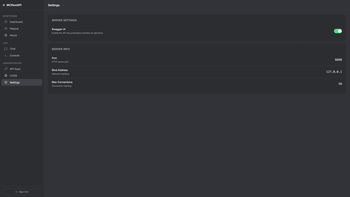
{ "auth": { "enabled": false } }This disables all authentication, including the admin endpoints — the reverse proxy becomes the only trust boundary. Only do this when bound to 127.0.0.1 behind a proxy that enforces access control. The mod logs a warning on startup (louder if the bind address is not loopback). You can also toggle it live from the dashboard (Settings → Require API Key), no restart required.
Permissions
| Permission | Description | Endpoints |
|---|---|---|
server.read |
Read server stats | GET /api/server |
players.read |
Read player list | GET /api/players |
world.read |
Read world data | GET /api/world |
chat.read |
Read event history | GET /api/chat |
chat.stream |
Connect to SSE event stream | GET /api/events/stream |
command.execute |
Execute server commands | POST /api/command |
* |
All permissions (wildcard) | All endpoints |
API Endpoints
Base URL: http://<host>:<port> (default: http://localhost:8080)
For detailed request/response examples, see the built-in Swagger UI at /api/docs.
Public (no auth required)
| Method | Path | Description |
|---|---|---|
| GET | /api/server/icon |
Server icon as PNG image |
| GET | /api/docs |
Swagger UI |
| GET | /api/openapi.json |
OpenAPI 3.1.0 spec |
Data Endpoints
| Method | Path | Permission | Description |
|---|---|---|---|
| GET | /api/server |
server.read |
Server stats (TPS, MSPT, memory, CPU). Supports ?fields= filtering |
| GET | /api/players |
players.read |
Online player list with health, position, dimension, ping |
| GET | /api/world |
world.read |
Global world data and per-dimension stats. Supports ?fields= filtering |
| GET | /api/chat |
chat.read |
Event history. Supports ?limit= and ?type= filtering |
| GET | /api/events/stream |
chat.stream |
Real-time SSE stream. Supports ?types= filtering |
| POST | /api/command |
command.execute |
Execute a server command |
Admin Endpoints (master key required)
| Method | Path | Description |
|---|---|---|
| GET | /api/admin/keys |
List all API keys |
| POST | /api/admin/keys |
Create a new API key |
| PUT | /api/admin/keys?id= |
Update an API key |
| DELETE | /api/admin/keys?id= |
Revoke an API key |
| GET | /api/admin/cors |
Get CORS configuration |
| POST | /api/admin/cors |
Add an allowed origin |
| PUT | /api/admin/cors |
Toggle CORS enabled/disabled |
| DELETE | /api/admin/cors |
Remove an allowed origin |
| GET | /api/admin/settings |
Get current settings |
| PUT | /api/admin/settings |
Update settings |
SSE Event Stream
Connect to /api/events/stream for real-time server events. Events are sent in standard SSE format. A keepalive ping is sent every 30 seconds.
Event types: chat, command, join, leave, death, game
For browser-based SSE connections, pass the API key via ?auth= query parameter since EventSource does not support custom headers.
CORS
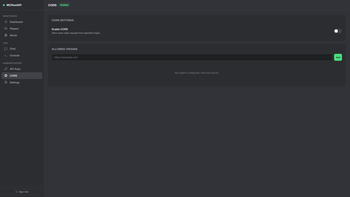
CORS is disabled by default. When enabled, only origins in the allowlist receive CORS headers. Configure via the admin dashboard or /api/admin/cors endpoints.
CORS only provides protection in the browser context. It does not replace API key authentication.
Admin Dashboard
Built-in web dashboard at /admin (requires master key).
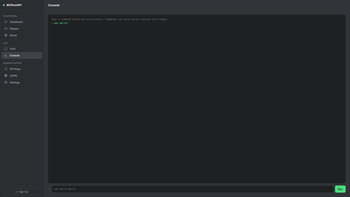
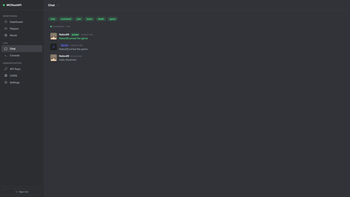
Pages: Dashboard (server stats), Players, World, Chat (live SSE stream), Console (command execution), Keys, CORS, Settings.
Security
- Default bind address is
127.0.0.1(localhost only) - API keys hashed with PBKDF2-SHA256 with random salt
- Master key stored separately from API keys
- For remote access, use a reverse proxy (nginx, Caddy) with HTTPS/TLS
- Create API keys with minimal permissions needed for each use case
- Only disable authentication when bound to
127.0.0.1behind a trusted reverse proxy that enforces auth
请登录后举报
请 登录 后赞助作者。
暂无评论,抢个沙发吧~