
Locations
作者:rebot | 分类:模组
Minecraft 版本: 26.2
平台: fabric
标签: utility
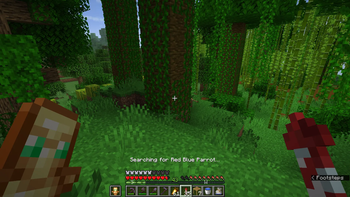
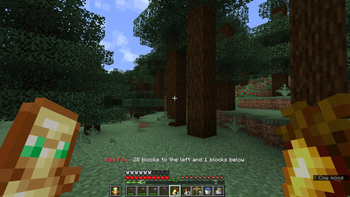
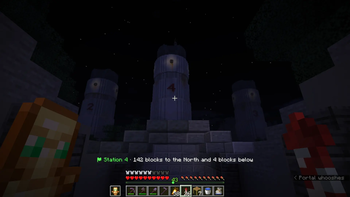
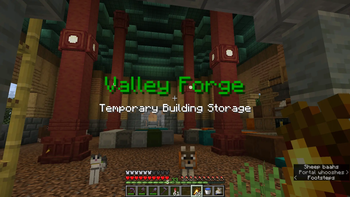
Locations
Found the perfect spot to build, made a mental or physical note of the coordinates, and still somehow lost them when you need them again?
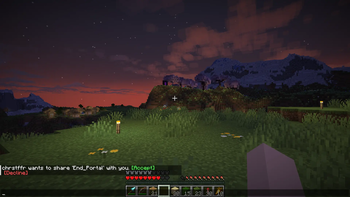
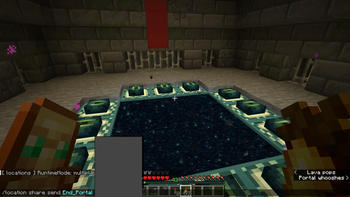
Have you ever stumbled onto something incredible and wished you could share the coordinates with your friends, even if they are offline?
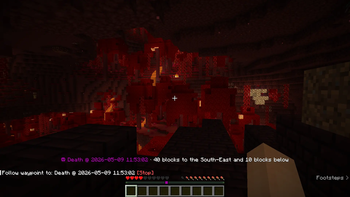
Did you just die in the middle of nowhere and cannot find your way back to your stuff?
Are you collecting and taming all wolf variants? Now you can track that last one you can't find!
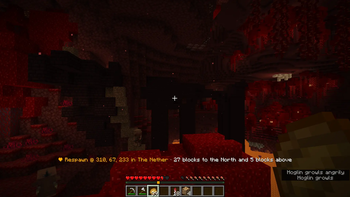
Locations is a versatile and highly customizable mod that lets you save named locations in-game — private ones only you can see, and public ones the whole server can access. When you want to head back, they can guide you with a waypoint using the Locator Bar.
This page documents Locations 1.1.0. Some commands and behaviors differ in previous versions.
Singleplayer
- Your locations are saved in the world like on a server.
- You have access to every feature.
Multiplayer (only installed on client)
- Your locations are stored in profiles locally. You can have multiple and switch when you change servers.
- Mob tracking and biome search only scan loaded chunks. The server’s render distance caps scanned area, even when the client render distance is higher.
Multiplayer (only installed on server)
- Works for all connected players, even without the mod on their client.
- Server admins can allow or disallow features per world and per player.
- Client features like key binds are not available.
Multiplayer (both on client and server)
- Full feature set, including sharing and profile migration.
- When you join a modded server, your local profile can be uploaded to the server.
Requirements
- Minecraft 26.2
- Fabric Loader 0.19.3+
- Fabric API 0.152.1+26.2
Help
Run /location help in chat for a link to this page and our Discord.
Add and edit locations
Use /location to save named places, list them in chat, and view or edit their details. On a multiplayer server your locations are private, unless you choose to make them public.
| Command | Description |
|---|---|
/location add <name> |
Save your current position, dimension, and biome under a name. |
/location list |
List your saved locations and automatic captures. |
/location list <filter> |
Filter by dimension (overworld, nether, end, or a full dimension id), shared, or hidden. |
/location show <name> |
Show coordinates, dimension, biome, colors, owner, description, and other details. |
List and show output includes clickable links for common actions—guide, teleport, share, edit, hide or unhide, convert (for automatic captures), and remove. Tab completion suggests names and filters where possible.
| Subcommand | Type | Default | Description |
|---|---|---|---|
color <slug> |
color slug or random |
inherit (player → world locationColor) |
Color for this location in lists, guide, and announcements. random resolves once when set. |
symbol <slug> |
symbol slug | inherit (player → world symbol) |
Icon shown in list and show output. |
description <text> |
text | empty | Notes shown in show output and title announcement. |
arrivalDistance <n> |
integer (−1–128) | −1 (inherit player → world arrivalDistance) |
Distance in blocks from the location that triggers area announcements. |
announcement <mode> |
none, chat, actionbar, or title |
none |
How players are notified when entering the area. |
public <value> |
true or false |
false |
Make an owned location visible to everyone on a multiplayer server. Allowed by default. |
hidden <value> |
true or false |
not hidden | Hide or show a public or shared location in your own lists without affecting others. |
rename [alias] |
text (optional) | none | Set a personal alias for any location you can access; omit the alias to clear it and show the original name again. |
remove |
— | — | Delete an owned location or automatic capture; prompts for confirmation. |
remove confirm |
— | — | Delete immediately without the confirmation prompt. |
convert <newname> |
name | — | Turn a death or respawn capture into a regular saved location under a new name. |
Use /location edit <name> … with the subcommands above. Most subcommands apply only to locations you own; rename and hidden also work on public and shared locations. Per-location announcement and arrival settings are listed here; see Announcements for cooldowns and global toggles, and Colors and Symbols for available slugs.
Config
Mod behavior and display defaults are stored in JSON and exposed through /location config. World settings define server-wide defaults and which features are permitted; player settings override those defaults for you. On a multiplayer server, numeric player values can be set to -1 to inherit the world default; colors and symbols inherit when unset. The value used at runtime—the effective value—resolves location → player → world when several layers apply (see Add and edit locations).
When the mod is installed on the client only, there is no world config—all settings are changed through /location config player.
Player settings (colors, symbols, distances, retention, and similar):
/location config player list/location config player get <setting>/location config player set <setting> <value>
World settings (server admins only):
/location config world list/location config world get <setting>/location config world set <setting> <value>
Reload (admins):
/location config reload
| Setting | Scope | Default | Description |
|---|---|---|---|
allowPublic |
World | allowed | Let players make locations public. |
allowGuiding |
World | allowed | Let players use /location guide. |
allowTracking |
World | allowed | Let players use /location track. |
allowBiomes |
World | allowed | Let players use /location biome. |
allowAnnouncement |
World | allowed | Let players use per-location announcements. |
allowSharing |
World | allowed | Let players use /location share. |
allowTeleport |
World | not allowed | Let players use /location teleport. |
allowMigration |
World | allowed | Let players request profile migration to the server. |
debug |
World | false |
Extra logging for troubleshooting. |
maxWaypointsPerDimension |
World | 16 |
Maximum personal waypoints per dimension. |
deathRetention |
World default; player override | 3 |
How many recent death captures to keep (0 disables). Player: -1 inherits. |
respawnRetention |
World default; player override | 3 |
How many recent respawn captures to keep (0 disables). Player: -1 inherits. |
arrivalDistance |
World default; player override | 8 |
Default announcement trigger distance (blocks). Player: -1 inherits. |
foundDistance |
World default; player override | 3 |
Distance (blocks) for track “found” feedback. Player: -1 inherits. |
biomeDistance |
World default; player override | 0 |
Distance (blocks) for biome “found” feedback. Player: -1 inherits. |
maxBiomeDistance |
World default; player override | 1024 |
Maximum search radius (blocks) for biome locate. Player: -1 inherits. |
announcementCooldown |
World default; player override | 30 |
Seconds before the same announcement can fire again. Player: -1 inherits. |
distanceMode |
World default; player override | compass |
Actionbar style for guide, track, and biome: compass, relative, or simple. |
locationColor |
World default; player override | gold |
Default color for new locations and guide. Accepts random. |
mobColor |
World default; player override | red |
Default track waypoint color. Accepts random. |
biomeColor |
World default; player override | green |
Default biome search waypoint color. Accepts random. |
waypointColor |
World default; player override | white |
Default /location waypoint color. Accepts random. |
textColor |
World default; player override | white |
Chat and UI body text. |
successColor |
World default; player override | green |
Success messages and positive links. |
failureColor |
World default; player override | red |
Errors and destructive actions. |
accentColor |
World default; player override | gray |
Secondary labels in config and list output. |
linkColor |
World default; player override | aqua |
Clickable command links. |
headingColor |
World default; player override | gold |
Section headings in chat output. |
symbol |
World default; player override | flag |
Default location list symbol. |
deathSymbol |
World default; player override | skull |
Symbol for automatic death captures. |
respawnSymbol |
World default; player override | heart |
Symbol for automatic respawn captures. |
autoDecline |
Player | false |
Automatically decline incoming share invites. |
guideOnDeath |
Player | true |
After player is killed, show a prompt to guide back to place of death. |
receiveAnnouncements |
Player | true |
Whether area announcements are shown to you. |
migrationPrompt |
Player | true |
Prompt to migrate an existing client profile when joining a modded server. |
JSON-only settings (edit config.json defaults; not exposed on /location config):
| Setting | Scope | Default | Description |
|---|---|---|---|
trackFrequency |
World | 1 |
Active mob track update interval. In seconds, range 1–10. |
biomeFrequency |
World | 10 |
Active biome search UI/waypoint refresh interval. In seconds, range 1–10. |
biomeSearchCooldown |
World | 30 |
Minimum gap between expensive biome locates; session cache used between searches. |
omitRandomColors |
World | ["black"] |
Color slugs excluded from the random pool. Not available via config commands. |
In previous versions this was split into admin and option.
Automatic
Deaths and Spawnpoints are automatically saved and appear in your /location list.
/location config player|world set deathRetention <number>allows you to decide how many are kept in history./location config player|world set respawnRetention <number>allows you to decide how many are kept in history.
Setting any retention to 0 disables automatic capture, but will not delete already stored data.
You can also convert automatic captures to regular locations by clicking [Show] in the list, then clicking [Convert].
When you perish, you are automatically prompted to be guided back to the location via waypoint.
/location config player set guideOnDeath falseallows you to turn off this feature.
Color, description, and symbol
Every location can have a text description, a specific color, and a symbol used in guiding and announcements.
Color and symbol only accept suggested values.
/location edit <location> color <slug>/location edit <location> symbol <slug>/location edit <location> description <text>
Announcements
Players can automatically be notified when entering the proximity of a saved location.
Locations have announcement set to none, but can be changed to title, actionbar, or chat.
All modes support color; title also supports description, and actionbar supports symbol.
/location edit <location> announcement <mode>
| Mode | Use | Description |
|---|---|---|
none |
– | Announcement is not shown. |
title |
color, description |
Large center-aligned text |
actionbar |
color, symbol |
Small text above HUD |
chat |
color, description, symbol |
Chat message |
/location edit <location> arrivalDistance <number>sets the distance (in blocks) from the location where the announcement is triggered./location config world|player set announcementCooldown <number>sets the number of seconds before the announcement is shown again./location config player set receiveAnnouncements falsedisables all announcements.
Aliases
Locations that you do not own cannot be changed, but they can be hidden or renamed.
/location edit <public or shared location name> rename <your alias>/location edit <public or shared location name> renamewithout an alias, returns the original name.
Guiding
Guiding uses the actionbar and locator bar with a waypoint. The actionbar shows how far you are from your destination.
/location guide start <location>/location guide stop
There are three different ways of showing distance, you can switch between them using:
/location config player set distanceMode <mode>
| Mode | Description | Example |
|---|---|---|
compass |
Default mode; shows you the orientation in cardinal and ordinal directions | 79 blocks to the South-East and 3 blocks below |
relative |
Shows direction with facing keywords; straight ahead, behind, left and right | 79 blocks straight ahead and 3 blocks below |
simple |
Minimalistic; shows distance without direction | 79 blocks |
Tracking
Tracking allows you to find the closest mob by name, variant and age, using Guiding.
Not all mobs have variants nor age, and allowed values are suggested.
/location track start <mob> [variant] [adult|baby]/location track stop
Example
/location track start wolfguides you to the closest wolf./location track start wolf chestnutguides you to the closest chestnut wolf./location track start wolf chestnut babyguides you to the closest chestnut wolf puppy.
Note
On a regular multiplayer server, tracking searches within the tracking player’s render distance.
Singleplayer behaves slightly differently and also includes any loaded chunk beyond that cap.
Biome Searching
Biome searching finds the closest matching biome and guides you with a waypoint.
/location biome start <biome>/location biome stop
On a server (or in singleplayer), search uses vanilla biome locate within maxBiomeDistance (default 1024 blocks, up to 6400). On client-only multiplayer, search is limited to loaded terrain within render distance and cannot match server-side /locate biome beyond that.
Note: A very large server-side search radius may cause lag spikes — comparable to vanilla /locate biome. Expensive locates are rate-limited by biomeSearchCooldown; recent results are cached in memory between searches.
Teleport
/location teleport <location>— teleport to a location you can access
Requires allowTeleport on the server and either op status or a personal grant.
Waypoints
Quick locator bar markers separate from saved locations:
/location waypoint add— mark your feet/location waypoint add <x> <y> <z> [color] [dimension]/location waypoint clear— remove all in this dimension/location waypoint clear <x> <y> <z> [dimension]
These markers are persistent, personal, and cannot be shared. Admins can determine how many waypoints a player can have per dimension using maxWaypointsPerDimension. Waypoints closer than 3 blocks apart are not allowed, to prevent spamming.
Admin
For operators or players with admin access. Grants override world defaults for individual players.
/location admin grant <player> <perm> <true|false>— perms:admin,guiding,public,sharing,teleport,tracking,biomes/location admin list <player>— grants and saved locations/location admin remove <player>— delete all player data (useremove <player> confirmto confirm)/location admin cleanup orphan <player>— remove data for a player no longer on a whitelisted server/location admin cleanup ignore <player>— stop orphan notifications for that name
Sharing
Sharing a private location with another player requires the mod on the server.
Send an invite:
/location share send <location> <player>/location share send <location> <player> <message>
Share workflow is handled by prompts, but you can interact with them through commands as well.
Manage invites:
/location share list— pending and accepted shares; use the chat links to accept or decline/location share accept|decline <owner> <location>— respond to an invite (also available from list links)/location share cancel <location> <player>— revokes a sent invite
Remove access:
- Use list links to cancel a pending invite you sent, or remove a share from your side
Sharing can be disabled worldwide; admins can still grant it to individual players.
If client and server mod versions do not match, sharing is blocked until both are updated.
/location config player set autoDecline trueopts you out of future sharing requests.
Profiles
Client-only (multiplayer with mod on client, not on server).
Profiles keep separate location sets per server or world.
/location profile list— your profiles and which one is active/location profile add <profile>/location profile rename <oldName> <newName>/location profile switch <profile>/location profile remove <profile>— asks for confirmation; useremove <profile> confirmto delete
Profile names use lowercase letters, digits, ., _, and - (max 64 characters).
When you first join a server without a profile for it, the mod may prompt you to create one.
If you play on multiple servers and one or more have the mod installed and the others do not, you can opt out of the migration prompt by setting migrationPrompt to false:
/location config player set migrationPrompt false
Migration
Move a local profile onto a modded server so your locations become server-side saves.
Player (client, when migration is offered):
/location migrate <profile>— request migration; an admin must accept/location migrate <profile> cancel— cancel your pending request/location migrate <profile> <token>— upload after an admin accepts (token shown to the admin)
Admin (server):
/location admin migration list/location admin migration accept <player>/location admin migration decline <player>/location admin migration delete <player>
Migration requires the mod on both client and server, matching versions, and allowMigration enabled (or a personal grant). After a successful upload, the client keeps a hint that the profile was migrated.
Key Binds
There are four key binds available if you have the mod installed on your client.
They are not configured by default.
- Add current location – adds current coordinates as an untitled location
- List locations – same as
/location list - Add waypoint – same as
/location waypoint add - Remove closest waypoint – remove the closest waypoint
Data files
Singleplayer world:
- World config:
saves/<world>/data/dev.chrstffr.locations/config.json - Player data:
saves/<world>/data/dev.chrstffr.locations/players/<uuid>.json - Shares:
saves/<world>/data/dev.chrstffr.locations/shares.json
Server world:
- World config:
config/dev.chrstffr.locations/config.json - Player data, shares, and migrations:
<world>/data/dev.chrstffr.locations/
Client (multiplayer, mod on client only):
- Client config:
config/dev.chrstffr.locations/config.json - Profile data:
config/dev.chrstffr.locations/profiles/<profile>.json
Contact
License
Copyright © 2026 chrstffr
This project is licensed under CC BY-NC-SA 4.0.
You may use, modify, and redistribute it with attribution, for non-commercial use, under the same license.
请登录后举报
请 登录 后赞助作者。
暂无评论,抢个沙发吧~