
Armor Stand Storage
作者:rebot | 分类:模组
Minecraft 版本: 1.8 1.8.1 1.8.2 1.8.3 1.8.4 1.8.5 1.8.6 1.8.7 1.8.8 1.8.9 1.9 1.9.1 1.9.2 1.9.3 1.9.4 1.10 1.10.1 1.10.2 1.11 1.11.1 1.11.2 1.12 1.12.1 1.12.2 1.13 1.13.1 1.13.2 1.14 1.14.1 1.14.2 1.14.3 1.14.4 1.15 1.15.1 1.15.2 1.16 1.16.1 1.16.2 1.16.3 1.16.4 1.16.5 1.17 1.17.1 1.18 1.18.1 1.18.2 1.19 1.19.1 1.19.2 1.19.3 1.19.4 1.20 1.20.1 1.20.2 1.20.3 1.20.4 1.20.5 1.20.6 1.21 1.21.1 1.21.2 1.21.3 1.21.4
平台: bukkit paper spigot

?️ Armor Stand Storage v1.0

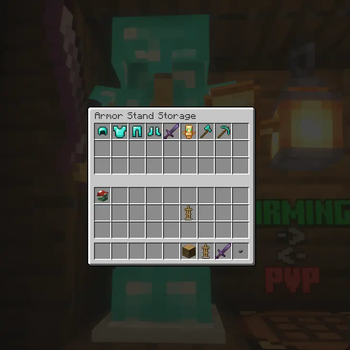
Transform your armor stands into functional storage units while maintaining their display capabilities! Perfect for kits, storage rooms, and displays.
Version: 1.0
Minecraft Versions: 1.8 - 1.21.x
Release Date: 1/27/25
✨ Features
- Smart Storage System
- Shift + Right-Click any armor stand to access storage
- 27 slots of storage space per armor stand
- Items in armor slots automatically display on the stand
- Regular right-click still works for vanilla interactions
- Intelligent Armor Detection
- Automatically detects and displays armor pieces
- Works with any armor type (leather, iron, gold, diamond, netherite)
- Supports modded armor that follows naming conventions
- Compatible with Elytra and player heads
- Server Friendly
- Multi-world support with configurable blocked worlds
- Minimal performance impact
- SQLite database for reliable storage
- Works on Minecraft 1.8+
? Usage
- Place an armor stand
- Add armor/items normally OR
- Shift + Right-Click to open storage
- Place items anywhere in the inventory:
- Armor pieces will automatically display
- Other items are safely stored
- First 6 slots are prioritized for display
⚙️ Configuration
# Disable storage in specific worlds
disabled-worlds:
  #- spawn_world
  #- event_world

# Debug mode for detailed logging
debug: false

# Storage settings
storage:
  inventory-title: "Armor Stand Storage"
  inventory-rows: 3
? Permissions
armorstandstorage.use- Access to armor stand storage (default: op)
? Commands
No commands - just shift-right-click to use!
? Tips
- Place armor in any slot - it will automatically display
- Use regular right-click for vanilla armor stand features
- Items are saved even if the armor stand breaks
- Works great for shop displays and storage rooms
- Perfect for RPG servers and town builds
? Installation
- Download the plugin
- Place in your plugins folder
- Restart server
- Configure (optional)
- Start using!
? Planned Features
- Custom inventory sizes
- Per-world inventory settings
- Hologram support
- Shop integration
- API for developers
? What's New in 1.0
- Initial release
- Full armor stand storage functionality
- Multi-world support
- Automatic armor detection and display
- SQLite database integration
- Legacy version support (1.8+)
? Version History
- 1.0 (1.27.2025)
- Initial release
- Core functionality implemented
- Database storage system
- Multi-version support
ArmorStandStorage v1.0 - © 2024 Koopa
Made with ❤️ by Koopa
storage free armorstand plugin 1.8-1.21
请登录后举报
暂无评论,抢个沙发吧~