
Colorful Armor Bar
作者:rebot | 分类:模组
Minecraft 版本: 1.21.11
平台: fabric
标签: equipment utility
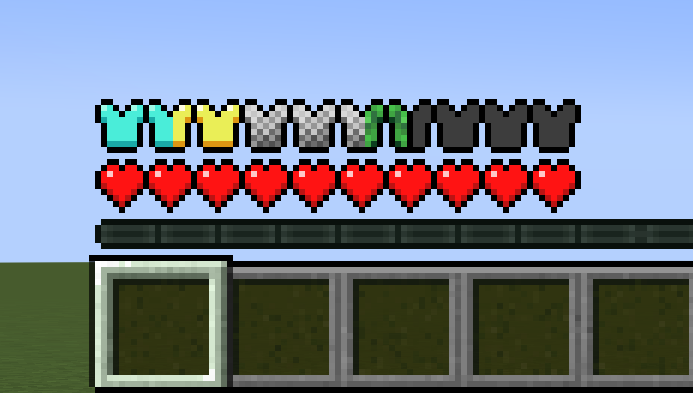
Colorful Armor Bar
Tired of Netherite, Diamond, and Leather looking exactly the same on your HUD? Colorful Armor Bar is a lightweight, client-side mod that colors your armor bar icons based on the exact gear you're wearing.
How it Works
The project is heavily inspired by Detail Armor Bar, but under the hood, this mod takes a completely data-driven approach. (Currently some icons, like the turtle, are from their repo, but we are working on making our own)
Instead of hardcoding compatibility or waiting for backend code updates, everything is driven by resource packs. Out of the box, the mod dynamically scans for textures mapped to your armor materials. If a mod adds a new armor tier, anyone can easily add flawless visual support for it with a resource pack—no code changes required.
Features
- Mix-and-Match: If you're wearing a diamond chestplate with netherite boots, the mod automatically splits your armor shield icons to accurately show both materials at once.
- 100% Client-Side: Safe to use on any public server or multiplayer network. You don't need it installed on the server for it to work.
- Fully Customizable: Don't like the default colors? You can easily change the icons or add support for modded armor using resource packs.
For Resource Pack Creators & Mod Developers
Supporting a custom armor set is incredibly straightforward. All you need to do is drop a .png texture into the folder matching the armor's material name.
The mod automatically checks this path structure:
assets/<mod_id_or_namespace>/textures/armoricon/<material_name>.png
- Vanilla Example:
assets/minecraft/textures/armoricon/diamond.png - Modded Example: If a mod named
flingleblobadds arubyarmor set, you would place the texture in:assets/flingleblob/textures/armoricon/ruby.png
Note: If the mod can't find a custom texture for an armor material, it safely falls back to a clean, default iron-style template.
请登录后举报
请 登录 后赞助作者。
暂无评论,抢个沙发吧~