
AlaHorde
作者:rebot | 分类:模组
Minecraft 版本: 26.1.2
平台: neoforge
标签: mobs
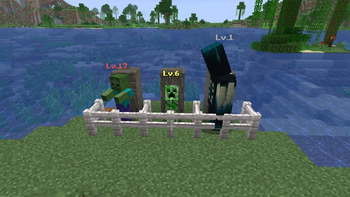
AlaHorde
Hostile mobs grow stronger as you kill them — a global per-species kill counter raises HP, damage, speed and XP for every new spawn.
- Minecraft: 1.21.10 (26.1.2)
- Loader: NeoForge 26.1.2.28-beta
- Side: both client and server (vanilla clients can join a server with this mod)
- License: MIT
- Languages: English, Русский, Українська, Deutsch, Español, Français, Português (BR), 日本語, 简体中文, Polski
How it works
Every hostile mob (MobCategory.MONSTER — zombie, skeleton, creeper, witch, enderman, blaze, ghast, wither, ender dragon, warden, …) has its own world-wide kill counter. Every 25 player kills of a species bumps that species to the next level — every NEW spawn of that species after that point comes in stronger.
| Stat | Per-level scaling | Attribute |
|---|---|---|
| Max health | +10% over base | MAX_HEALTH |
| Attack damage | +8% over base | ATTACK_DAMAGE |
| Movement speed | +5% over base | MOVEMENT_SPEED |
| XP drop | +10% over base | via LivingExperienceDropEvent |
Cap at level 20 by default. All thresholds and multipliers are configurable in serverconfig/alahorde-server.toml or via the in-game Mods → AlaHorde → Settings UI.
Each spawned mob gets a styled [Lv.N] label above its head, color-tiered by level (gray Lv.1 → white 2-5 → yellow 6-10 → gold 11-15 → red 16-20). The label is occluded by solid blocks — no X-Ray cheating; the level only shows when the mob is in line of sight.
When a species levels up, all players within the configured radius get a chat broadcast and flame/smoke particles burst at the kill site.
Bosses (Wither, Ender Dragon, Warden) are included by default — only attribute base values are touched, so boss AI phases stay intact.
Commands
| Command | Permission | What it does |
|---|---|---|
/alahorde info |
everyone | Shows the tracked species with current level, kill count and threshold to the next level |
/alahorde reset all |
op (level 2) | Resets every species' kill counter to zero |
/alahorde reset <mob_id> |
op (level 2) | Resets a single species (e.g. /alahorde reset minecraft:zombie) |
Configuration
The config file lives at <world>/serverconfig/alahorde-server.toml. The same options are editable from the in-game Mods → AlaHorde → Settings screen.
| Option | Default | Description |
|---|---|---|
general.enabled |
true |
Master switch — when off, the mod is fully inert (no scaling, no labels, no kill counting) |
general.killsPerLevel |
25 |
Kills required per level-up |
general.maxLevel |
20 |
Level cap; kills are still counted past it |
general.excludedMobs |
[] |
Entity ids opted out of the system (e.g. ["minecraft:bat"]) |
scaling.hpMultiplierPerLevel |
0.10 |
HP gain per level (0.10 = +10%) |
scaling.dmgMultiplierPerLevel |
0.08 |
Attack damage gain per level |
scaling.speedMultiplierPerLevel |
0.05 |
Movement speed gain per level |
scaling.xpMultiplierPerLevel |
0.10 |
XP drop gain per level |
visuals.showLevelLabel |
true |
Show [Lv.N] above mobs |
visuals.showLevelUpMessage |
true |
Broadcast a chat message on level-up |
visuals.levelUpMessageRadius |
-1 |
Notify radius (blocks); -1 = entire server |
Installation
- Install NeoForge 26.1.2.28-beta for Minecraft 1.21.10.
- Download the latest
alahorde-26.1.2-<version>.jarfrom the Files tab on this page. - Drop the jar into
.minecraft/mods/(client) or<server>/mods/(server). - Launch.
Compatibility
- Multiplayer: progress is stored in the world's
SavedData, shared across all players on the server. - Other mods: mob tags / categories from other mods are respected. Use
excludedMobsto opt out specific species. - Modpacks: zero hard dependencies. Drop in and go.
License
MIT © Artem Pavelko (Ma3auka).
请登录后举报
暂无评论,抢个沙发吧~