
HoleFiller
作者:rebot | 分类:模组
Minecraft 版本: 1.21 1.21.1 1.21.2 1.21.3 1.21.4 1.21.5 1.21.6 1.21.7 1.21.8 1.21.9 1.21.10 1.21.11
平台: paper
HoleFiller Plugin


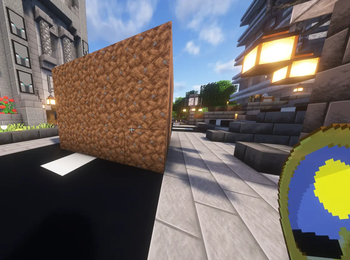
HoleFiller is a lightweight and powerful Minecraft Paper plugin designed to help players easily fill areas, caves, and holes in survival mode without replacing existing blocks. Instead of tedious manual placement, players can select two points and let the plugin do the work!
✨ Features
- Survival Friendly: Players must have the required blocks in their inventory. Blocks are consumed upon placement. (Completely free in Creative Mode).
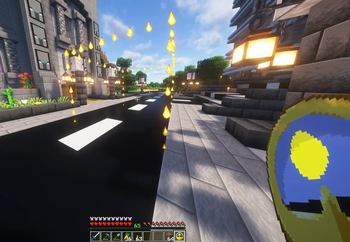
- Visual Selection: Use a Clock to right-click and left-click to define your area. Visual flame particles will display a 3D bounding box outlining your selection in real-time.
- Smart Replacement: The plugin only replaces air, water, lava, and grass. It will never overwrite solid blocks or buildings that are already placed.
- Interactive GUI: Opens a visual menu (
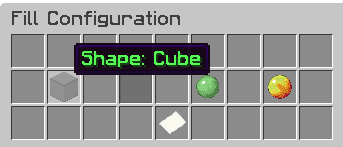
/fillarea) allowing players to choose whether they want to generate a Cube, a Sphere, a Hollow Cube, or a Hollow Sphere. They then click the block they want to use from their own inventory. - Anti-Lag System: Blocks are placed progressively over time (e.g., 500 blocks per tick) to prevent server crashes or lag spikes on massive selections.
- Secure Undo System: Made a mistake? Use
/fillundoto instantly revert your last action and get your blocks refunded! The plugin has anti-duplication checks to ensure players cannot exploit the refund system. - Smart Block Connections: Connected textures like Fences, Glass Panes, and Walls automatically connect to adjacent blocks. Block orientation (like Stairs or Logs) automatically aligns with the player's rotation when executing the command.
- Multi-Language Support: Fully translatable configurations, natively supporting English, French, Spanish, and German.
?️ Commands
/fillarea- Opens the interactive GUI to select the shape and material for the filled area. (Requires an active selection)./fillundo- Reverts your last fill action and refunds the blocks safely to your inventory./filllang <en|fr|es|de>- Admin command to change the plugin's active language directly in-game without restarting./fillconfig <setting> <value>- Admin command to changeconfig.ymlvariables in-game dynamically (e.g.,/fillconfig max_blocks 100000). Supported options aremax_blocks,blocks_per_tick, andOnlyForOp.
? Permissions
holefiller.use- Allows a player to use the selection clock,/fillarea, and/fillundo.holefiller.admin- Allows an admin to use/filllangand/fillconfig.
(Note: If OnlyForOp is set to true in the config, permissions are bypassed and only Server Operators can use the plugin).
⚙️ Configuration (config.yml)
The config.yml file is automatically generated and contains the following parameters:
lang: Sets the default language of the plugin. Native options:en,fr,es,de. (Default:en).OnlyForOp: If set totrue, only server Operators (OPs) can use the selection tools and commands, regardless of standard permission nodes. (Default:true).max_blocks: The maximum number of blocks a player can modify in a single operation. Prevents players from selecting the entire map by accident. (Default:50000).blocks_per_tick: The number of blocks placed per server tick (1/20th of a second) during a fill operation. Lower this value if your server experiences lag during large fills. (Default:500).
? How to Use
- Hold a Clock in your main hand.
- Left-Click a block to set Position 1.
- Right-Click a block to set Position 2. (A fiery outline box will appear around your selection).
- Type
/fillareato open the GUI. - Click on the gray glass to choose your desired shape (Cube, Sphere, Hollow Cube, Hollow Sphere).
- Click on the block in your player inventory (bottom section of the GUI) that you want to use to fill the area.
- The plugin will calculate the required blocks, consume them from your inventory, and begin filling progressively!
- If you made a mistake, type
/fillundoimmediately to revert the terrain and get your blocks back.
请登录后举报
暂无评论,抢个沙发吧~